Key takeaways
- Find a monitor privacy screen that fits your screen size, blocks side views, and cuts glare. Compare five filters for 24-inch and 27-inch monitors.
A monitor privacy screen keeps your display visible to you and dark to anyone sitting beside you. It is a thin filter that narrows the viewing angle, so spreadsheets, messages, medical records, and financial documents stay out of sight in open offices, shared workspaces, libraries, and busy homes.
Choosing the right filter starts with size, not brand. Measure the visible width and height of your monitor, confirm the aspect ratio, and check whether your screen has a raised bezel or a flat edge-to-edge panel. A filter made for a 24-inch 16:9 monitor will not fit a 27-inch monitor.
As an Amazon Associate, we earn from qualifying purchases.
Quick Answer
For most desks, the Kensington MagPro 24 Inch Magnetic Privacy Screen is the best monitor privacy screen because it attaches with magnets, removes in seconds, and suits slim-bezel 24-inch monitors. For two matching monitors, choose the Mamol 2 Pack 24 Inch set. For a larger display, the ZYY 2 Pack 27 Inch set covers a 27-inch 16:9 screen.
Kensington MagPro 24 Inch Magnetic Privacy Screen

The Kensington MagPro 24 Inch Magnetic Privacy Screen is built for a 24-inch desktop monitor with a 16:9 aspect ratio and a slim bezel. It uses a magnetic attachment, so you can lift it off when a colleague needs to see your screen and put it back without adhesive strips or slide tabs. That quick on-and-off design suits shared desks, hot-desking, and meeting rooms.
Kensington describes the filter as a privacy screen with anti-glare treatment and blue light reduction. The narrow viewing angle keeps the image clear from directly in front of the monitor while darkening it from the side. The model number is K55418WW, which helps you confirm that you are ordering the 24-inch 16:9 version rather than the 27-inch version, which uses a different model number and a different ASIN. This is a premium pick for office workers who value fast removal.
Specs
- Size: 24 inches, 16:9 aspect ratio
- Model number: K55418WW
- Mounting: Magnetic attachment, removable
- Viewing angle: Narrow side-angle privacy
- Finish: Anti-glare with blue light reduction
- Compatibility: Slim-bezel desktop monitors
- Pack size: Single filter
- Price group: Premium
Mamol 2 Pack 24 Inch Computer Privacy Screen

The Mamol 2 Pack 24 Inch Computer Privacy Screen covers two matching 24-inch monitors with a 16:9 aspect ratio. Each filter measures 20.94 inches wide by 11.77 inches high, which matches the visible area of a standard 24-inch widescreen display. The pack suits a dual-monitor desk, a home office with a spare screen, or two workstations in the same room.
Mamol lists the material as polyethylene terephthalate with a matte finish and a 9H hardness rating. The filters use adhesive strips or slide mount tabs, which work with monitors that have a raised bezel and with many flat-panel displays. The listing names Dell, HP, Samsung, Lenovo, LG, Acer, ASUS, Toshiba, and ViewSonic among the compatible monitor brands. It is a practical mid-range choice for a dual setup.
Specs
- Size: 24 inches, 16:9 aspect ratio
- Dimensions: 20.94 inches wide by 11.77 inches high
- Material: Polyethylene terephthalate
- Finish: Matte
- Hardness: 9H
- Mounting: Adhesive strips or slide mount tabs
- Compatibility: Dell, HP, Samsung, Lenovo, LG, Acer, ASUS, Toshiba, and ViewSonic
- Pack size: Two filters
- Price group: Mid-range
JEEETINTX Magnetic Computer Privacy Screen 24 Inch
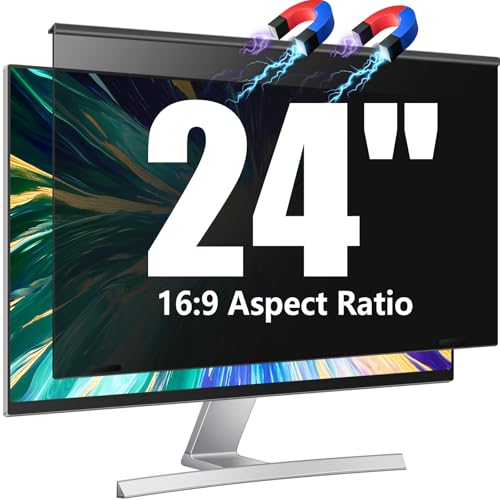
The JEEETINTX Magnetic Computer Privacy Screen is a 24-inch filter for a frameless monitor with a thin bezel and a 16:9 aspect ratio. It is designed to hang and attach magnetically, which makes it easy to remove when you want a clear view for design work, video calls, or a shared presentation. The removable design also makes it easy to clean the monitor underneath.
The listing describes the filter as an anti-glare shield with blue light eye protection and an anti-spy privacy effect. It is made for 23.6-inch, 23.8-inch, and 24-inch monitors with a 16:9 aspect ratio, so it suits the common sizes found on office desks. This is a budget pick, best for a single frameless monitor in a shared space. Confirm that your monitor is frameless or thin-bezel before ordering, because a thick raised bezel can prevent a magnetic filter from sitting flat.
Specs
- Size: 24 inches, 16:9 aspect ratio
- Compatibility: 23.6-inch, 23.8-inch, and 24-inch monitors
- Mounting: Magnetic, hanging, removable
- Finish: Anti-glare
- Features: Blue light eye protection and anti-spy privacy
- Compatibility: Frameless monitors with a thin bezel
- Pack size: Single filter
- Price group: Budget
ZYY 2 Pack 27 Inch Computer Privacy Screen Filter
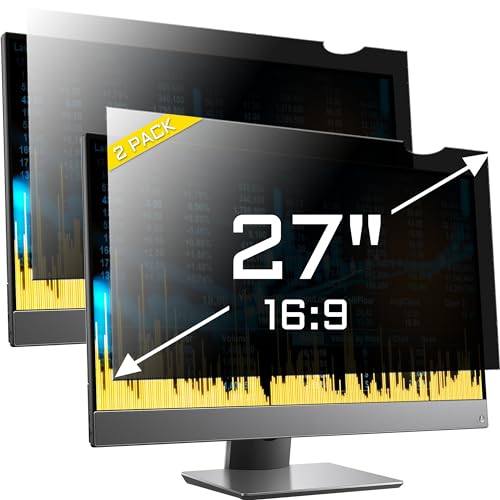
The ZYY 2 Pack 27 Inch Computer Privacy Screen Filter is the large-screen pick in this roundup. It is made for a 27-inch monitor with a 16:9 aspect ratio, and each filter measures 23 9/16 inches wide by 13 1/4 inches high. That size matches the visible area of a standard 27-inch widescreen display, including many curved monitors.
The pack includes two filters, so it suits a dual 27-inch desk. The listing describes the filters as anti-glare and anti-UV privacy protectors with a curved-monitor fit. A 27-inch filter is a different product from a 24-inch filter, so do not order this pack for a 24-inch monitor and expect it to fit. This is a mid-range pick for larger displays and for anyone who moved to a 27-inch screen and now needs the same side-angle privacy they had on a smaller monitor.
Specs
- Size: 27 inches, 16:9 aspect ratio
- Dimensions: 23 9/16 inches wide by 13 1/4 inches high
- Mounting: Removable filter for desktop monitors
- Finish: Anti-glare
- Features: Anti-UV privacy protection
- Compatibility: Flat and curved 27-inch monitors
- Pack size: Two filters
- Price group: Mid-range
Magicmoon 2 Pack 24 Inch Computer Privacy Screen Filter

The Magicmoon 2 Pack 24 Inch Computer Privacy Screen Filter is a two-pack for a 24-inch widescreen monitor with a 16:9 aspect ratio. The filter measures 531 mm wide by 298 mm high, which matches the visible area of a standard 24-inch display. The pack includes two filters, so it suits a dual-monitor desk without ordering two separate singles.
Magicmoon describes the filters as anti-spy and anti-glare protectors with blue light eye protection. The removable design lets you take the filter off for colour-sensitive work and put it back for normal office tasks. The two-pack format also gives you a spare if one filter is damaged. This is a budget pick, best for a home office with two matching 24-inch monitors or a small business that needs the same filter on more than one desk.
Specs
- Size: 24 inches, 16:9 aspect ratio
- Dimensions: 531 mm wide by 298 mm high
- Mounting: Removable protector film
- Finish: Anti-glare
- Features: Anti-spy privacy and blue light eye protection
- Compatibility: 24-inch widescreen monitors, 16:9 aspect ratio
- Pack size: Two filters
- Price group: Budget
How to choose
Start by measuring the visible screen area, not the outside of the monitor. Use a tape measure across the lit area from edge to edge, then from top to bottom, and compare those numbers with the filter dimensions in the listing. A 24-inch monitor usually has a visible width near 20.9 inches and a height near 11.8 inches, while a 27-inch monitor is wider and taller. If your numbers do not match, look for a filter made for your exact size.
Next, confirm the aspect ratio. Most office monitors are 16:9, but some are 16:10 or ultrawide. A 16:9 filter will not cover a 16:10 screen correctly, and an ultrawide monitor needs a filter made for its wider shape. Then check the bezel. A raised bezel works well with adhesive strips and slide mount tabs, while a flat edge-to-edge panel often works better with a magnetic filter.
Consider how often you will remove the filter. Magnetic filters are best for frequent removal, while adhesive and slide-tab filters are best for a filter that stays in place most of the time. Finally, think about glare and brightness. Privacy filters can make the screen look darker from the front, so a matte finish helps in a bright room.
Who should skip
Skip a monitor privacy screen if you work alone in a private room and nobody can see your display. In that case, a privacy filter adds glare and reduces brightness without adding useful protection. A standard anti-glare screen protector is a better fit if glare is your only concern.
Skip a fixed filter if you do colour-critical work, such as photo editing or print design. Privacy film changes how colours and contrast look, so a magnetic filter that removes in seconds is a better option. Also skip a privacy screen if your monitor is an ultrawide, a portrait display, or a curved screen that the listing does not name.
Frequently Asked Questions
What size monitor privacy screen do I need?
Measure the visible width and height of your screen and match those numbers to the filter dimensions. A 24-inch 16:9 monitor usually needs a filter near 20.9 inches wide by 11.8 inches high, while a 27-inch 16:9 monitor needs a filter near 23.6 inches wide by 13.3 inches high. Do not order by diagonal size alone, because monitors with the same diagonal size can have different visible areas.
Do monitor privacy screens work on curved monitors?
Some filters work on curved monitors, and some do not. The ZYY 27-inch filters in this roundup are listed for flat and curved monitors, while other filters are listed for flat monitors only. Check the listing for curved-monitor support before ordering.
Will a privacy screen make my monitor darker?
Yes, most privacy filters make the screen look slightly darker from the front, because the microlouver film blocks light from side angles. You can usually compensate by raising the monitor brightness. If your monitor is already at full brightness in a bright room, choose a filter with a clear front view and a matte finish to reduce glare.
How do I install a monitor privacy screen?
Installation depends on the mounting type. Magnetic filters attach to a magnetic strip on the monitor frame and lift off without tools. Adhesive filters use transparent strips on the bezel, and slide-tab filters use tabs that hold the filter in place. Clean the screen first, align the top edge, and press the filter into place slowly to avoid dust and air bubbles.
Final verdict
The best monitor privacy screen for most desks is the Kensington MagPro 24 Inch Magnetic Privacy Screen, because it fits a common 24-inch 16:9 monitor, attaches magnetically, and removes in seconds for shared viewing. For a dual-monitor desk, the Mamol 2 Pack 24 Inch set is the better value, because it covers two matching screens in one pack. For a larger display, choose the ZYY 2 Pack 27 Inch set, and for a frameless monitor on a tight budget, the JEEETINTX magnetic filter is a practical option. Measure your screen first, then choose the filter that matches it exactly.