Key takeaways
- Looking for the best Blu-ray drive? Compare five top Blu-ray drives for watching movies, burning discs, and archiving files at home or in the office.
A Blu-ray drive still earns its place on a desk in 2026. Streaming services rotate their catalogs, cloud storage subscriptions add up over time, and large video projects need a physical home. A good Blu-ray drive plays movies in high definition, burns discs that hold far more than a DVD, and gives a home office a reliable way to archive photos, documents, and finished work.
The right drive depends on how it will be used. A slim portable model suits a laptop and a living room, a fast desktop model suits heavy archiving, and an internal drive suits a tower PC with a spare bay. The five drives below cover those needs, from compact portable writers to a full-size desktop unit built for serious backup duty.
As an Amazon Associate, we earn from qualifying purchases.
Quick Answer
For most people, the LG BP60NB10 is the best Blu-ray drive because it plays Ultra HD Blu-ray discs, writes BDXL media, and runs from a single USB connection in a slim portable body. Heavy archivers should look at the LG WH16NS40 or the LG BE16NU50 for faster sixteen times Blu-ray writing, while Mac users who want a ready-to-use desktop enclosure will appreciate the OWC Mercury Pro.
1. LG BP60NB10
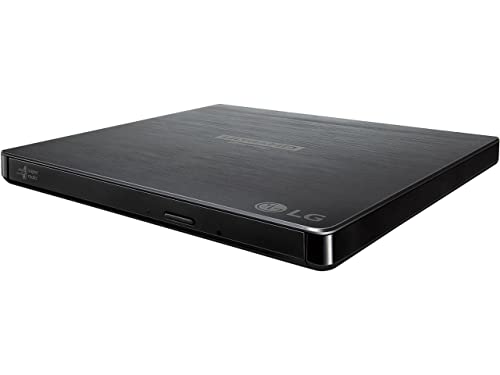
The LG BP60NB10 is the most versatile drive in this roundup. It is an ultra-slim portable writer that reads and writes Blu-ray, DVD, and CD media, and it supports Ultra HD Blu-ray playback, which makes it a strong choice for watching movies on a laptop or a home office PC. Its compact body slips into a laptop bag without fuss, and it draws power through its USB connection, so there is no separate power brick to carry.
Archiving is where this drive quietly shines. BDXL support means a single triple-layer disc can hold up to 100GB of files, photos, or business documents, and M-DISC support is designed for discs that resist data degradation over time. Noise reduction technology keeps the drive quieter during movie playback, which matters when the drive sits on a desk next to the viewer.
Specs
- Drive type: Ultra-slim portable external Blu-ray writer
- Blu-ray write speed: 6x BD-R
- Blu-ray read speed: 6x
- Disc support: Blu-ray, BDXL, DVD, CD, M-DISC
- Interface: USB 2.0
- Ultra HD Blu-ray playback: Yes
- Special features: Noise reduction, M-DISC support
2. LG WH16NS40

The LG WH16NS40 is an internal SATA drive built for a desktop tower, and it is the fastest writer in this guide. Its sixteen times BD-R write speed cuts burning time sharply compared with slim portable drives, which makes it the natural pick for anyone who archives large video projects or burns discs in batches. BDXL support covers triple-layer discs up to 100GB and quad-layer discs up to 128GB, so a single disc can hold an entire project archive.
Because it is an internal drive, it needs a free 5.25-inch bay and a SATA connection inside a desktop PC. That limits it to tower owners, but the trade-off is speed and capacity that portable drives cannot match. M-DISC support adds long-term archival value, and the drive also reads and writes the full DVD and CD families, so it can replace an older optical drive outright.
Specs
- Drive type: Internal SATA Blu-ray rewriter
- Blu-ray write speed: 16x BD-R
- Blu-ray read speed: 16x
- Disc support: Blu-ray, BDXL, DVD, CD, M-DISC
- Interface: SATA
- Buffer size: 4 MB
- Weight: 1.54 pounds
3. OWC Mercury Pro 16X Blu-ray

The OWC Mercury Pro takes the speed of a full-size internal burner and puts it in a desktop enclosure that works with Mac and Windows systems. It reads and writes Blu-ray discs at up to sixteen times speed, DVDs at sixteen times, and CDs at forty-eight times, which covers everything from movie playback to large data backups. Two blank BD-R discs are included, so the drive is ready for archiving work out of the box.
The enclosure is the point here. It is a solid, desk-friendly unit with a matching finish that looks at home next to a Mac or a workstation, and it connects over USB 3.0 for fast transfers. The drive inside is based on the LG WH16NS40 mechanism, which is a proven performer for Blu-ray writing, and the bundle includes the cables needed to get started. For a home office that needs a dependable desktop burner without opening a PC case, this is the simplest route to full-speed Blu-ray writing.
Specs
- Drive type: External desktop Blu-ray read and write solution
- Blu-ray write speed: 16x
- DVD write speed: 16x
- CD write speed: 48x
- Disc support: Blu-ray, DVD, CD, M-DISC
- Interface: USB 3.0
- Model number: OWCMR3UBDRW16
- Included: Two blank BD-R discs and cables
4. LG BE16NU50

The LG BE16NU50 is a full-size external Blu-ray writer for users who want maximum speed without installing an internal drive. It writes BD-R media at up to sixteen times speed over USB 3.0, supports BDXL discs up to 128GB, and handles 3D Blu-ray playback alongside standard Blu-ray, DVD, and CD media. That combination makes it equally useful for archiving large files and for watching a movie collection.
LG adds two playback features that matter in daily use. Silent Play controls disc spin speed to reduce noise during movies, and Jamless Play smooths playback of scratched or damaged discs. M-DISC support is included for archival discs designed to last, and a buffer under-run prevention function helps avoid failed burns. It is larger and heavier than the slim portable drives in this guide, so it suits a fixed desk setup rather than a travel bag.
Specs
- Drive type: External Blu-ray and DVD writer
- Blu-ray write speed: 16x BD-R
- Disc support: Blu-ray, BDXL, DVD, CD, M-DISC
- Interface: USB 3.0
- Buffer size: 4 MB
- Special features: 3D Blu-ray playback, Silent Play, Jamless Play
- M-DISC support: Yes
5. Pioneer BDR-XD05B

The Pioneer BDR-XD05B is the smallest and lightest drive in this roundup, and it is built for portability. At 230 grams with a footprint close to the size of a CD case, it fits in a laptop sleeve and draws power over USB 3.0, so it needs no external power supply. It writes Blu-ray discs at up to six times speed and supports BDXL media, which keeps it useful for backups as well as movie playback.
Pioneer designed this drive for people who move between a home office, a client site, and a living room. It reads and writes Blu-ray, DVD, and CD media, works with Windows and Mac systems, and its slim profile means it can live permanently in a bag without adding noticeable bulk. Speed is lower than the desktop models here, so large archiving jobs take longer, but for watching discs and burning occasional backups on the go, its size is hard to beat.
Specs
- Drive type: Slim portable external Blu-ray burner
- Blu-ray write speed: 6x
- Disc support: Blu-ray, BDXL, DVD, CD
- Interface: USB 3.0
- Weight: 230 grams
- Dimensions: 133 by 133 by 14.8 millimeters
- Power: USB bus powered
How to choose
Start with the form factor. A portable drive suits a laptop or a shared workspace, a desktop external drive suits a fixed desk with room for a larger unit, and an internal drive suits a tower PC with a spare bay. Portable drives are slower and usually top out at six times Blu-ray writing, while desktop and internal drives reach sixteen times, which matters when burning large archives.
Next, check disc support. BDXL support is worth having for archiving because it allows discs up to 100GB or 128GB, far more than a standard 25GB Blu-ray disc. M-DISC support is worth having for files that must survive for years, since M-DISC media is designed to resist degradation. For movie watching, confirm Ultra HD Blu-ray playback support if the collection includes 4K discs, and check that the drive works with the operating system on the computer it will connect to.
Finally, think about software and connections. Some drives include playback and burning software, while others need a separate program for Blu-ray movie playback. USB 3.0 or later gives faster transfers than USB 2.0, and a drive powered over USB avoids an extra power adapter on the desk.
Who should skip
A Blu-ray drive is not for everyone. People who watch everything through streaming services and never handle physical discs will get little use from one, and a drive will sit unused in a drawer. Anyone who only needs to read DVDs or CDs can save money with a basic DVD drive, since Blu-ray writing speed and BDXL support add cost that a DVD-only user will never use.
Small laptops with only USB-C ports need an adapter or a USB-C cable before most of these drives will connect, so check the ports first. Owners of slim all-in-one PCs and mini PCs should also check for a free USB port with enough power, since some bus-powered drives need a full-power port to spin up reliably.
Frequently Asked Questions
Can a Blu-ray drive play DVDs and CDs too?
Yes. Every drive in this guide reads and writes DVD and CD media in addition to Blu-ray discs, so one drive can replace a separate DVD drive. That makes a Blu-ray drive a useful single optical drive for a home office that still has older discs.
Do I need special software to watch Blu-ray movies on a PC?
Often, yes. Windows and macOS do not always include Blu-ray movie playback out of the box, so a dedicated player program is usually needed for commercial Blu-ray discs. Some drives bundle playback software, while others need a separate purchase, so check what is included before buying.
What is BDXL and why does it matter?
BDXL is a high-capacity Blu-ray format that stores up to 100GB on a triple-layer disc and up to 128GB on a quad-layer disc. It matters for archiving because a single BDXL disc can hold what would take four or five standard Blu-ray discs, which simplifies long-term storage of video projects and photo libraries.
Can a portable Blu-ray drive run from a laptop USB port?
Most slim portable drives are bus powered and run from a single USB port, but they need a port that delivers enough power to spin the disc. If a drive fails to spin up, try a different port, use the supplied cable, or connect through a powered hub, since low-power ports on some ultrabooks can struggle with optical drives.
Final verdict
The best Blu-ray drive for most people is the LG BP60NB10, because it combines Ultra HD Blu-ray playback, BDXL archiving, and a slim portable body that works anywhere. Desktop users who burn discs often should step up to the LG WH16NS40 or the LG BE16NU50 for sixteen times writing speed, and Mac users who want a ready-to-use desktop unit should consider the OWC Mercury Pro. Travelers who value size above all will be happiest with the Pioneer BDR-XD05B.