Key takeaways
- Find the best trackball mouse for a comfortable desk setup. Compare thumb and center-ball designs, wireless and wired options, and ergonomic features.
A trackball mouse stays in one place while you roll a ball with your thumb or fingers to move the cursor. That simple change can make a real difference on a crowded desk or in a small home office. You do not need to lift and reposition the device, and you do not need a large clear surface beside your keyboard. For many office workers, the best trackball mouse is the one that feels natural after a full day of email, documents, and spreadsheets.
The right choice depends on how you work. A thumb-operated ball suits right-handed users who want a sculpted shape and a familiar grip. A center ball suits users who want to share a desk, switch hands, or control the cursor with the index and middle fingers. Wireless models keep the desk tidy, while wired models remove charging and battery worries. This guide compares five trackball mice, so you can match the design to your hand, your desk, and your daily tasks.
As an Amazon Associate, we earn from qualifying purchases.
Quick Answer
For most desk users, the Logitech MX Ergo S is the best trackball mouse because its adjustable tilt, thumb ball, and rechargeable wireless design suit long work sessions. If you want a simpler and lighter option, the Logitech Ergo M575S is a strong mid-range pick. For a large center ball and wired reliability, choose the Kensington Expert Mouse instead.
1. Logitech MX Ergo S Advanced Wireless Trackball Mouse

The Logitech MX Ergo S is the most advanced trackball mouse in this guide, built for people who spend long hours at a desk. Its thumb-operated ball gives precise control with small movements, and a dedicated button switches between speed and high-precision tracking.
Comfort is the main reason to choose this model. The sculpted shape supports a medium to large right hand, and the base tilts to a 20-degree angle for a more relaxed forearm position. Six programmable buttons can be set up through the Logi Options+ app. Wireless connectivity covers Bluetooth and the included Logi Bolt USB receiver, with an Easy-Switch button for two devices. The rechargeable battery charges through USB-C, and a full charge lasts up to 120 days under typical use.
Specs
- Ball position: thumb-operated
- Tilt: adjustable to a 20-degree angle
- Buttons: 6 programmable buttons
- Connectivity: Bluetooth and Logi Bolt USB receiver
- Device switching: Easy-Switch for up to 2 devices
- Charging: USB-C rechargeable battery
- Battery life: up to 120 days on a full charge
- Software: Logi Options+ app for button setup and shortcuts
- Hand fit: sculpted for medium to large right hands
- Tier: premium
2. Logitech Ergo M575S Wireless Trackball Mouse

The Logitech Ergo M575S is a simpler and lighter thumb trackball: move the cursor with your thumb while your hand stays still. Its sculpted right-hand shape supports the palm, and the smooth ball is easy to reach without stretching the fingers.
This model connects through Bluetooth and an encrypted USB dongle, so it works with a laptop, a desktop, or a shared workstation without a cable crossing the desk. The controls are straightforward, with left and right click, a scroll wheel, and forward and back buttons. It sits in the mid-range group in this guide, and it covers the essentials well without extra setup.
Specs
- Ball position: thumb-operated
- Connectivity: Bluetooth and encrypted USB dongle
- Buttons: left click, right click, scroll wheel, forward, and back
- Design: sculpted ergonomic shape for the right hand
- Tracking: smooth and precise thumb-ball tracking
- Compatibility: Windows and macOS computers
- Colour option in this guide: Graphite with a blue ball
- Tier: mid-range
3. Kensington Expert Mouse Wired Trackball
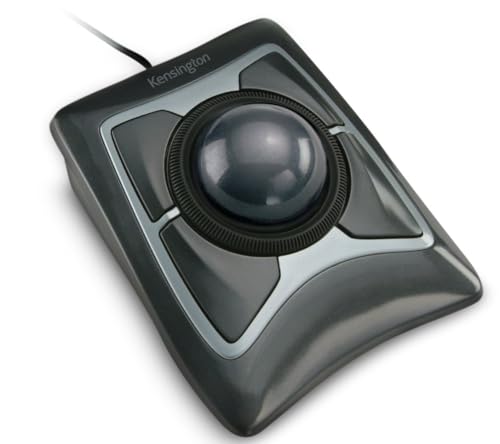
The Kensington Expert Mouse is a classic center-ball trackball for users who want a large ball and a stable wired connection. The 55mm ball sits in the middle of the base, so you can roll it with the index and middle fingers, and the design works for right-handed and left-handed users.
Four buttons sit around the ball, and they can be customised through KensingtonWorks software. A scroll ring around the ball moves quickly through web pages and long files. The wired USB connection keeps the response steady and removes any need to charge a battery, which suits a fixed desk setup. A detachable wrist rest supports the hand during long sessions.
Specs
- Ball position: center ball, 55mm diameter
- Ball control: index and middle fingers
- Buttons: 4 customisable buttons
- Scrolling: scroll ring around the ball
- Connectivity: wired USB
- Tracking: DiamondEye optical tracking
- Wrist support: detachable wrist rest included
- Hand fit: ambidextrous design for left and right hands
- Software: KensingtonWorks for button setup
- Tier: premium
4. Kensington Orbit Trackball Mouse with Scroll Ring

The Kensington Orbit Trackball Mouse with Scroll Ring is a compact center-ball option in a smaller and simpler package. The ball sits in the middle of the base, and the scroll ring around it handles vertical movement through pages and documents. Two buttons cover left and right click, so the layout stays clear and easy to learn.
This model is a budget pick in this guide, and it suits a second desk, a shared computer, or a first trackball for general office use. The ambidextrous shape works for either hand, and the wired USB connection keeps setup simple. The base is smaller than the Expert Mouse, so it fits well on a crowded desk or beside a laptop.
Specs
- Ball position: center ball
- Buttons: 2 buttons for left and right click
- Scrolling: scroll ring around the ball
- Connectivity: wired USB
- Design: compact and ambidextrous
- Tracking: optical trackball tracking
- Use case: general office work and shared desks
- Tier: budget
5. Logitech M570 Wireless Trackball Mouse
The Logitech M570 is a long-running wireless thumb trackball with a simple and proven design. Its sculpted right-hand shape supports the hand through a full workday, and the thumb ball moves the cursor without moving the arm. The compact base fits well on a small desk.
Wireless connection runs through a tiny Logitech Unifying receiver that stays in the laptop or desktop. The receiver can also connect up to six compatible wireless devices. Battery life is long, with up to 18 months of use from a single AA battery under typical use, so battery changes are rare.
Specs
- Ball position: thumb-operated
- Connectivity: 2.4 GHz wireless with Logitech Unifying receiver
- Receiver: connects up to six compatible wireless devices
- Buttons: left click, right click, scroll wheel, forward, and back
- Design: sculpted right-hand shape
- Battery: single AA battery, up to 18 months of use
- Compatibility: Windows and macOS computers
- Tier: budget
How to Choose the Best Trackball Mouse
Start with the ball position. Thumb balls suit right-handed users who want a sculpted grip and a familiar hand position. Center balls suit users who want to share a device, switch hands, or control the cursor with the fingers.
Next, choose between wireless and wired. Wireless models keep the desk clear and suit laptops and shared workstations. Wired models suit a fixed desk and remove battery worries. If you choose wireless, check whether the model uses Bluetooth, a USB receiver, or both, and whether it can switch between two computers. Button layout is the next decision: more buttons suit users who rely on shortcuts, while fewer buttons suit users who want a simple layout. A scroll ring or scroll wheel is also worth checking. Size and hand fit come last: a large center ball gives fine control, while a smaller thumb ball gives quick and light movement.
Who Should Skip a Trackball Mouse
A trackball mouse is not the right choice for every user. If you play fast action games that need rapid and wide cursor movement, a standard gaming mouse may suit you better. If you often work on the move, a compact wireless mouse may be more practical. Center-ball models work for either hand, but most thumb-ball models are shaped for the right hand only.
Finally, a trackball takes time to learn. If you need to work at full speed on a tight deadline today, switching to a new input style may slow you down. Give yourself a few days to adjust, and keep your old mouse nearby during the change.
Frequently Asked Questions
Is a trackball mouse better than a standard mouse for desk work?
A trackball mouse can be better for desk work when space is limited or when you want to keep your hand still. The device stays in one place, so you do not need a large clear area beside the keyboard. A standard mouse can be better for fast and wide movements.
How long does it take to get used to a trackball mouse?
Most users need a few days to feel comfortable with a trackball mouse. Start with basic tasks such as browsing, email, and documents, and use the trackball for short sessions at first. Precision improves as your thumb or fingers learn the ball movement.
Can a trackball mouse work for left-handed users?
Yes, center-ball trackball mice work for left-handed users because the ball sits in the middle of the base and the layout is ambidextrous. Most thumb-ball models are shaped for the right hand only, so left-handed users should choose a center-ball model.
Do trackball mice need much desk space?
No, trackball mice need very little desk space because the base stays still while the ball moves the cursor. That makes them useful on crowded desks, in small home offices, and beside a laptop.
Final Verdict
The best trackball mouse for most desk users is the Logitech MX Ergo S, thanks to its adjustable tilt, thumb-ball precision, six programmable buttons, and rechargeable wireless design. The Logitech Ergo M575S is the best mid-range thumb option for users who want a simpler wireless design, while the Kensington Expert Mouse is the best center-ball choice for users who want a large ball and wired reliability. For a smaller desk or a first trackball, the Kensington Orbit offers the core benefits in a compact and budget-friendly package. For a proven wireless thumb design with long battery life, the Logitech M570 remains a practical pick. Choose the ball position first, then the connection type and size.