Key takeaways
- Find the best SD cards for video recording in this guide to V30, V60 and V90 cards for 4K and 8K footage, with speeds, capacities and camera fit explained.
Finding the best SD cards for video recording comes down to one thing that matters more than any other: sustained write speed. A card that can keep up with your camera’s video bitrate records clean, uninterrupted footage. A card that cannot will stop mid-take, drop frames, or refuse to start recording at all. The good news is that the video speed class printed on every card — V30, V60, or V90 — tells you exactly what minimum sustained write speed you are getting, so you can match the card to your camera instead of guessing.
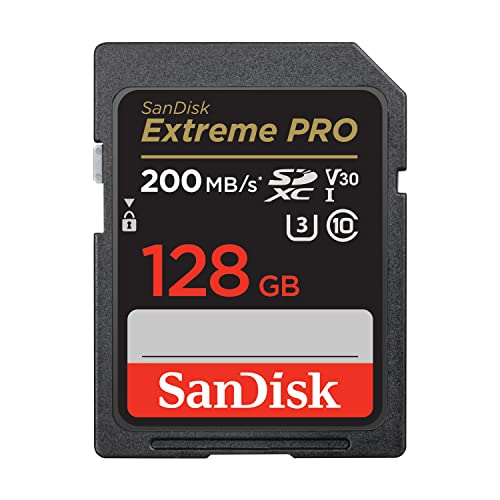

The quick answer is simple. For everyday 4K recording at standard frame rates, a V30 card such as the SanDisk Extreme PRO UHS-I 128GB is enough. For high-bitrate 4K, 4K at 60 frames per second and above, or 6K, step up to a V60 card such as the ProGrade Digital SDXC UHS-II V60 128GB. For 8K, all-intra codecs, or RAW video, a V90 card such as the Lexar Professional 2000x 128GB or the Sony TOUGH SF-G 128GB is the safe choice. The rest of this guide explains how to read those ratings, how much capacity you need, and which card fits which kind of shooting.
Quick Picks
Our Short List of 3
- Model number: SDSDXXD-128G-GN4IN
- Video speed class: V30, U3, Class 10
- Capacity: 128 GB SDXC
- Bus: UHS-I
- Model number: PGSD128GBJNA
- Video speed class: V60, U3, Class 10
- Capacity: 128 GB SDXC
- Bus: UHS-II

- Model number: LSD2000128G-BNNNU
- Video speed class: V90, U3, Class 10
- Capacity: 128 GB SDXC
- Bus: UHS-II
All 4 Picks at a Glance
| Product | Specs | Action |
|---|---|---|
| SanDisk Extreme PRO SDXC UHS-I 128GB — Best Budget Card for Everyday 4K Video |
| Check price on Amazon |
| ProGrade Digital SDXC UHS-II V60 128GB — Best Mid-Range Card for High-Bitrate 4K |
| Check price on Amazon |
| Lexar Professional 2000x 128GB — Best V90 Card for 8K and All-Intra Video |
| Check price on Amazon |
 Sony TOUGH SF-G 128GB — Best Card for Rough Conditions |
| Check price on Amazon |
How to Choose
Match the Video Speed Class to Your Footage
The video speed class is the single most useful number on an SD card for video work. V30 guarantees a minimum sustained write speed of 30 MB/s, V60 guarantees 60 MB/s, and V90 guarantees 90 MB/s. These are minimums, not peak figures, which is why they matter so much: a card only has to hold that speed for the whole take, not just for a few seconds.
As a rule of thumb, V30 covers standard 4K recording up to around 100 Mbps, which includes most 4K at 30 frames per second on mirrorless cameras and camcorders. V60 covers high-bitrate 4K up to around 200 to 300 Mbps, including 4K at 60 frames per second and many all-intra modes. V90 covers the most demanding formats: 8K video, 4K at 120 frames per second, and high-bitrate all-intra or RAW recording. Check your camera manual for its minimum card requirement, because some cameras simply will not enable their top recording modes without a card of a certain class.
Understand UHS-I Versus UHS-II
SD cards use one of two bus interfaces. UHS-I tops out at a theoretical 104 MB/s, while UHS-II adds a second row of pins and can reach around 312 MB/s. A V30 card is almost always UHS-I, while V60 and V90 cards are UHS-II. The catch is that a UHS-II card only reaches its full speed in a camera with a UHS-II slot. In a UHS-I camera, it still works, but it falls back to UHS-I speeds. Recording still works at the card’s rated minimum, but you pay for transfer speed you cannot use in that body. If your camera has only a UHS-I slot and you shoot standard 4K, a good V30 UHS-I card is the sensible buy. If your camera has a UHS-II slot, a V60 or V90 card makes full use of it.
Do Not Confuse Peak Speeds With Sustained Speeds
Card packaging shouts about peak read and write speeds, such as 300 MB/s or 250 MB/s. Those are burst figures measured in ideal conditions, and they mainly describe how fast files copy off the card. Video recording depends on sustained write speed, which is what the V-class rating guarantees. A card advertising a 170 MB/s write speed but rated only V30 still guarantees just 30 MB/s of sustained writing. For video, always read the V rating first and treat the headline speed as a secondary detail about offload times.
Pick the Right Capacity
Video eats storage fast. Roughly speaking, 4K footage at 100 Mbps uses about 45 GB per hour, and higher-bitrate modes can use double that or more. A 64 GB card holds about an hour of standard 4K, while 128 GB holds around two to three hours depending on the codec. For most shooters, 128 GB is the sweet spot: large enough for a full day of mixed shooting, small enough that a lost or damaged card does not take an entire trip’s footage with it. If you record long events, weddings, or interviews without breaks, consider 256 GB, or carry two 128 GB cards and swap between takes. Buying one enormous card is rarely the best plan, because it puts all of your footage in one place.
Check Your Camera’s Card Requirements
Before ordering, check three things in your camera manual or on the manufacturer’s support page: the card format your camera accepts (SDHC or SDXC), the bus it supports (UHS-I or UHS-II), and the minimum video speed class for the recording modes you plan to use. Some cameras, such as the Canon EOS R5 in its 8K mode or the Sony A7S III in its highest all-intra modes, require V60 or V90 cards. Others will warn you or stop recording if the card is too slow. Also confirm whether your camera has one card slot or two, and whether it can record to both at once for backup, which is a strong reason to buy matched pairs of the same card.
Buy From a Reputable Seller and Verify the Card
Counterfeit SD cards are common, and a fake card may report a large capacity while actually holding far less, which leads to corrupted or lost footage. Buy from the brand’s own store on Amazon or from a well-known camera retailer, and avoid listings with unusually low prices from unknown sellers. When the card arrives, check that the model number printed on the card matches the listing — for example, SDSDXXD-128G-GN4IN on the SanDisk Extreme PRO UHS-I 128GB — and format the card in your camera before first use. Formatting in the camera, rather than on a computer, ensures the card uses the file system your camera expects.
Think About Durability and Recovery
Video cards live hard lives: they get swapped in the field, carried in pockets, and used in heat, cold, dust, and rain. Look for cards rated waterproof, shockproof, temperature-proof, and X-ray-proof, which most cards in this guide are. Some cards add a recovery software download, which can help retrieve files from a card that has been accidentally formatted. No card is indestructible, so the best protection is a routine: back up footage at the end of every shoot, keep cards in a hard case, and retire any card that starts showing errors or unusually slow writes.
The Best SD Cards for Video Recording Reviewed
SanDisk Extreme PRO SDXC UHS-I 128GB — Best Budget Card for Everyday 4K Video
- Model number: SDSDXXD-128G-GN4IN
- Video speed class: V30, U3, Class 10
- Capacity: 128 GB SDXC
- Bus: UHS-I
The SanDisk Extreme PRO UHS-I 128GB is the card to buy if you shoot standard 4K video and want reliable performance without paying for speed your camera cannot use. It carries a V30 rating with U3 and Class 10 marks, which covers 4K UHD recording on the vast majority of mirrorless cameras, camcorders, and drones. Read speeds reach up to 200 MB/s with SanDisk QuickFlow technology, and write speeds reach up to 90 MB/s, so offloading a full card to a computer is quick.
This is a UHS-I card, which means it runs at full speed in any camera with an SD slot, including older bodies that predate UHS-II. That makes it the most broadly compatible card in this guide. The 128 GB capacity holds roughly two to three hours of standard 4K footage, and the card is shockproof, temperature-proof, waterproof, and X-ray-proof.
The limitation is the V30 ceiling. If your camera records high-bitrate all-intra 4K, 4K at 120 frames per second, or 6K and above, this card is not rated for those modes and your camera may refuse to record or stop mid-take. For standard 4K at 30 or 60 frames per second, though, it is the best value in this guide.
ProGrade Digital SDXC UHS-II V60 128GB — Best Mid-Range Card for High-Bitrate 4K
- Model number: PGSD128GBJNA
- Video speed class: V60, U3, Class 10
- Capacity: 128 GB SDXC
- Bus: UHS-II
The ProGrade Digital SDXC UHS-II V60 128GB sits in the sweet spot for serious video work. Its V60 rating guarantees a minimum sustained write of 60 MB/s, which covers high-bitrate 4K, 4K at 60 frames per second, and many 6K recording modes. Read speeds reach up to 250 MB/s and write speeds up to 130 MB/s on the 128 GB model, so both recording and offloading are fast.
ProGrade Digital was founded by former memory card industry professionals, and the card is built for professional use: it is tested in cameras from Canon, Nikon, Panasonic, Sony, and Blackmagic, and it carries a laser-etched serial number so the card can be tracked through manufacturing and support. The card is shockproof, X-ray-proof, and rated for temperatures from minus 25 to 85 degrees Celsius. It also works with the free ProGrade Refresh Pro software, which can check the card’s health and update its firmware.
The main thing to know is that you need a UHS-II camera slot to get the full benefit. In a UHS-I camera, the card still records at its V60 minimum, but its transfer speeds drop to UHS-I levels. Also note that the 128 GB version writes at up to 130 MB/s, while larger capacities in the same line are rated the same, so there is no speed penalty for choosing this size.
Lexar Professional 2000x 128GB — Best V90 Card for 8K and All-Intra Video
- Model number: LSD2000128G-BNNNU
- Video speed class: V90, U3, Class 10
- Capacity: 128 GB SDXC
- Bus: UHS-II
The Lexar Professional 2000x 128GB is a V90 UHS-II card built for the most demanding video formats. Its V90 rating guarantees a minimum sustained write of 90 MB/s, with read speeds up to 300 MB/s and write speeds up to 260 MB/s. That headroom covers 8K video, high-bitrate all-intra 4K, and RAW recording on cameras that demand the fastest SD media available.
The card uses model number LSD2000128G-BNNNU and is aimed squarely at cinema cameras and high-end mirrorless bodies. It is rated for Full HD, 4K, and 8K video, and its UHS-II interface keeps buffer clearing fast during long takes and rapid stills bursts. For videographers who shoot in all-intra codecs, where every frame is recorded in full, the sustained write performance is what keeps the camera recording without interruption.
The trade-off is that this is a premium card, and its full speed is only available in a UHS-II slot. In a UHS-I camera it still works, but you will not see the headline speeds. It is also more card than most casual shooters need — if you record standard 4K at 30 frames per second, a V30 or V60 card will serve you just as well for less. But for 8K or all-intra work, this is one of the most proven V90 options available.
Sony TOUGH SF-G 128GB — Best Card for Rough Conditions
- Model number: SF-G128T/T1
- Video speed class: V90, U3, Class 10
- Capacity: 128 GB SDXC
- Bus: UHS-II
The Sony TOUGH SF-G 128GB is the toughest card in this guide, and it is also one of the fastest. It carries a V90 rating with read speeds up to 300 MB/s and write speeds up to 299 MB/s, which covers 8K video, high-bitrate 4K, and all-intra recording. Its one-piece molded construction has no ribs and no write-protect switch, which removes the two parts of a standard SD card most likely to break.
Sony rates the TOUGH series as bend-proof to 180 newtons of force, drop-proof from 5 metres, waterproof to 5 metres for up to 72 hours, and dustproof, as well as resistant to X-rays, magnets, static, UV light, and temperature extremes. For documentary shooters, travel videographers, and anyone who works outdoors in bad weather, that durability is the point.
There are two things to note. First, the lack of a write-protect switch means you cannot lock the card against accidental formatting or deletion, so be careful when handling it. Second, like other V90 cards, it needs a UHS-II slot to reach its full speed; in a UHS-I camera it falls back to UHS-I speeds, though its V90 minimum sustained write still applies for recording.
What to Check Before You Buy
Before you place an order, run through this short checklist. First, confirm the minimum video speed class your camera requires for the recording modes you actually use, not just the modes you might use one day. Second, check whether your camera has a UHS-I or UHS-II slot, because that decides whether a V60 or V90 card can reach its full speed in your body. Third, choose a capacity that covers a full shoot with room to spare — 128 GB for most people, 256 GB for long events. Fourth, buy from the brand’s own store or a reputable camera retailer to avoid counterfeit cards. Fifth, when the card arrives, check that the model number on the card matches the listing, format it in your camera, and run a short test recording at your highest bitrate before trusting it on a paid shoot. Finally, plan your backup routine: a fast card is no substitute for copying footage to a second location at the end of the day.
FAQ
What is the best SD card for 4K video recording?
For most people shooting standard 4K video, a V30 card such as the SanDisk Extreme PRO UHS-I 128GB is enough. If you shoot high-bitrate 4K, 4K at 60 frames per second or above, or 6K, choose a V60 card such as the ProGrade Digital SDXC UHS-II V60 128GB. For 8K, all-intra, or RAW video, choose a V90 card such as the Lexar Professional 2000x or the Sony TOUGH SF-G.
Is V30 enough for 4K video?
Yes, for standard 4K recording. V30 guarantees a minimum sustained write speed of 30 MB/s, which covers 4K footage at bitrates up to around 100 Mbps, including most 4K at 30 frames per second. It is not enough for high-bitrate all-intra 4K, 4K at 120 frames per second, or 8K, where V60 or V90 is required.
What is the difference between V60 and V90 SD cards?
V60 guarantees a minimum sustained write speed of 60 MB/s, while V90 guarantees 90 MB/s. In practice, V60 covers high-bitrate 4K and 6K, while V90 is needed for 8K, high-frame-rate 4K, and RAW video. Both are UHS-II cards, and both need a UHS-II camera slot to reach their full transfer speeds.
Do I need a UHS-II card for video recording?
Not always. If your camera has a UHS-I slot and you shoot standard 4K, a good V30 UHS-I card is enough, and a UHS-II card will not record any faster in that body. You need a UHS-II card when your camera has a UHS-II slot and your recording modes demand V60 or V90 speeds, or when you want faster offloads to your computer.
How much storage do I need for video recording?
It depends on your bitrate. Standard 4K at 100 Mbps uses about 45 GB per hour, so a 128 GB card holds roughly two to three hours. Higher-bitrate modes use much more, so check your camera’s manual for its data rate at your chosen settings and size your card with a comfortable margin.
Bottom Line
The best SD cards for video recording are the ones that match your camera’s demands with room to spare. The SanDisk Extreme PRO UHS-I 128GB is the best value for everyday 4K video. The ProGrade Digital SDXC UHS-II V60 128GB is the best mid-range choice for high-bitrate 4K and 6K. The Lexar Professional 2000x 128GB and the Sony TOUGH SF-G 128GB are the best V90 options for 8K, all-intra, and RAW video, with the Sony winning on durability. Whichever you choose, match the video speed class to your footage, buy from a reputable seller, format the card in your camera, and back up your footage after every shoot.
Disclosure: As an Amazon Associate, we may earn from qualifying purchases.