Our Short List of 3
All 3 Picks at a Glance
| Product | Specs | Action |
|---|---|---|
 1. Thermalright Aqua Elite 120 V3 | Check price on Amazon | |
 2. Cooler Master MasterLiquid 120L Core | Check price on Amazon | |
 3. Thermaltake TH120 ARGB Sync V2 | Check price on Amazon |
Key takeaways
- Compare the best single 120mm closed loop liquid CPU coolers for compact builds, with socket support, fan speeds, noise levels, and clear buying advice.
A single 120mm closed loop liquid CPU cooler is the smallest form of all-in-one liquid cooling. It pairs one 120mm radiator with one 120mm fan and a sealed pump and cold plate assembly, so it fits in cases that have only one 120mm fan mount free. That makes it a practical option for small form factor builds, compact office machines, and older mid-tower cases where a 240mm or larger radiator simply has nowhere to go.
This guide covers three verified single-fan 120mm models that are still listed for sale on Amazon in the United States. Each one takes a different approach: one focuses on addressable RGB lighting and a quiet fan, one keeps the design plain and workmanlike with a dual chamber pump, and one adds motherboard-synchronized lighting with a mirror-finish water block. The sections below explain how to choose between them and what each model suits best.
As an Amazon Associate, we earn from qualifying purchases.
How to Choose a Single 120mm Closed Loop Liquid CPU Cooler
Start with honest expectations about cooling capacity. A 120mm radiator has roughly half the surface area of a 240mm unit, so it cannot move as much heat. These coolers make the most sense on mainstream processors running at stock settings, on compact builds where the alternative is a low-profile air cooler with a small fan, and on systems where keeping the area around the CPU socket clear matters for memory or graphics card clearance. For a high-wattage processor running long all-core workloads, a larger radiator or a large dual-tower air cooler is the better tool, and no 120mm unit in this guide should be bought with that job in mind.
Check radiator clearance before anything else. The radiator itself is usually about 27mm thick, and the fan adds another 25mm, so the combined stack needs a little over 50mm of clear depth at the mounting point, plus room for the tubes to bend without kinking. Rear exhaust mounts are the most common home for a 120mm radiator, but confirm that the radiator will not collide with the motherboard rear panel connectors, tall memory heat spreaders, or the top of a large graphics card. Also check tube length and routing: in a small case, tubes that are too long bunch up, while tubes that are too short limit where the radiator can sit.
Socket support is the next filter. Current models in this class cover Intel LGA 1700 and the older 115X family, and AMD AM5 and AM4, while the newest listings add Intel LGA 1851 support. Match the listing exactly to the motherboard in the build, because a cooler that lacks the right bracket cannot be adapted with parts from another brand. If a build may move to a newer platform later, choosing a model whose maker sells updated mounting kits can extend the life of the cooler.
Fan and pump control shape daily noise more than the radiator does. Look for a four-pin PWM fan so the motherboard can slow it down at idle, and check the stated speed range and noise figure in the specifications. A fan that tops out near 1,500 RPM will generally run quieter than one rated at 2,000 RPM, though it also moves less air at full speed. Pump noise matters too, especially in a quiet room, so a dual chamber pump design that separates the hot and cold sides of the loop is worth noting. Lighting is the final consideration: addressable RGB models need a three-pin 5V header on the motherboard for synchronized effects, while simpler models use a plain white LED or no lighting at all and need no extra cabling.
Finally, remember that a closed loop cooler is sealed and maintenance-free by design. There is no filling, draining, or custom tubing involved. The trade-off is that when the pump eventually reaches the end of its service life, the whole unit is replaced rather than repaired, which makes the warranty length in each specification table below a meaningful part of the comparison.
1. Thermalright Aqua Elite 120 V3
The Thermalright Aqua Elite 120 V3 is the most feature-rich option in this short list for builders who want lighting in a compact loop. It uses a 120mm aluminum radiator with a single ARGB PWM fan, and the pump housing carries addressable lighting as well, so both ends of the cooler can be matched to the rest of a build through a compatible motherboard header. The listing states support for Intel LGA 1150 through 1200, LGA 1700, and LGA 1851, along with AMD AM4 and AM5, which covers the platforms most compact builds use today.
On the specification sheet, the fan runs at up to 1,500 RPM and moves 66.17 CFM of air, with a stated noise level of 25.6 decibels. Those figures point to a cooler tuned more for low noise than for maximum airflow, which suits a small case that sits on a desk near the user. The fan uses an S-FDB bearing design, and the pump is a PWM-controlled unit, so both the fan and the pump can follow motherboard control curves instead of running at a fixed speed. The four-pin power connector confirms standard PWM fan control.
Installation follows the usual pattern for this class: mount the radiator and fan at a 120mm position, fit the correct socket bracket to the pump block, and connect the fan, pump, and lighting cables. Because the radiator stack is a standard single-fan depth, it fits the rear mount of most small cases without the clearance problems that come with thicker radiators.
Who It Suits
The Aqua Elite 120 V3 suits builders putting together a compact gaming or general-purpose system on a current Intel or AMD platform who want synchronized ARGB lighting without stepping up to a larger radiator. It is a sensible pick for a mainstream processor at stock settings in a small case with a window, where the lighting is visible and the modest fan speed keeps desk-side noise down. Builders planning sustained heavy overclocking should look at larger radiators instead, as with every cooler in this guide.
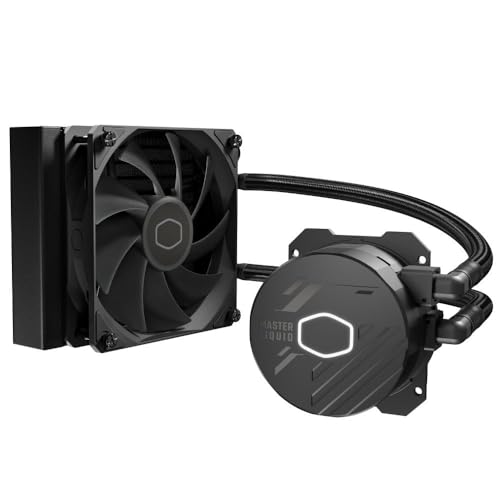
2. Cooler Master MasterLiquid 120L Core
The Cooler Master MasterLiquid 120L Core takes the opposite approach to lighting and presentation. It is a plain black cooler with a white LED pump accent rather than full addressable RGB, built around the company Gen S dual chamber pump. In that design, the pump chamber separates the incoming and outgoing coolant paths, and Cooler Master pairs it with a customized copper base intended to target the heat spreader area of the processor more precisely. The radiator surface area was also enlarged compared with the earlier Lite series design it replaces.
The specification data lists a single 120mm fan running from 650 to 1,750 RPM, with maximum airflow of 71.93 CFM, maximum static pressure of 1.86 mmH2O, and a maximum noise level of 27.2 decibels. The pump itself is rated with a mean time to failure of more than 70,000 hours and a maximum noise level of 12 decibels, and the fan bearing is a rifle bearing type with a stated life of more than 160,000 hours. The radiator measures 157 by 119.6 by 27.2mm, which is the standard footprint for this class and fits a single 120mm mount.
Socket coverage is broad. The listing names Intel LGA 1851, 1700, 1200, and the 115X family, plus AMD AM5 and AM4 and a long list of older AMD sockets reaching back through AM3, AM2, and the FM series. That breadth makes the 120L Core a useful option for refreshing an older system as well as for a new build, provided the case has a suitable 120mm mount. The package includes CryoFuze thermal paste, and the cooler carries a three-year warranty.
Who It Suits
The MasterLiquid 120L Core suits builders who want a closed loop cooler without lighting software, extra controllers, or a window-focused design. Its wide socket list makes it the most flexible choice here for older AMD and Intel systems that are being moved into a compact case, and the dual chamber pump and copper base suit everyday gaming and productivity processors run at stock settings. Buyers who specifically want addressable RGB effects should choose one of the other two models instead.
3. Thermaltake TH120 ARGB Sync V2
The Thermaltake TH120 ARGB Sync V2 is the middle path between the two coolers above. It combines a 120mm radiator and a single PWM fan with a mirror-finish water block, and its addressable lighting is designed to synchronize through the motherboard rather than through a separate controller ecosystem. The listing names compatibility with the major motherboard lighting platforms, including ASUS Aura Sync, Gigabyte RGB Fusion, MSI Mystic Light Sync, and ASRock Polychrome, so the cooler can follow the same effects as the rest of a build from one piece of software.
The fan is rated from 500 to 2,000 RPM, the widest speed range in this guide. That range gives the motherboard more room to trade airflow against noise: slow and quiet during desktop work, faster during a gaming session. The stated noise level is 25.8 decibels, and the pump uses a copper base plate under the mirror water block. The model number for this version is CL-W360-PL12SW-A, and it is sold as a single-fan 120mm unit in black.
Socket support covers Intel LGA 1700, 1200, and the 115X family, and AMD AM5 and AM4, along with older AMD sockets listed by the maker. That is narrower than the Cooler Master list at the newest end, since this listing does not name Intel LGA 1851, so builders on that newest Intel platform should confirm bracket availability before choosing this model. For the far more common LGA 1700 and AM5 builds, the included hardware covers the socket directly.
Who It Suits
The TH120 ARGB Sync V2 suits builders who want lighting that follows the motherboard they already own, without adding a brand-specific controller or software suite. The wide fan speed range makes it a reasonable choice for a mixed-use system that is quiet on the desktop and busier under load, and the mirror water block gives a windowed compact case a clean focal point. Builders on Intel LGA 1851 should pick one of the other two models, whose listings name that socket directly.
Frequently Asked Questions
Is a 120mm closed loop cooler enough for a modern gaming processor?
For a mainstream gaming processor running at stock settings, a 120mm closed loop cooler can be adequate, especially in a compact case where the realistic alternative is a small low-profile air cooler. It is not the right choice for a flagship processor running long rendering, compiling, or other all-core workloads, because a single 120mm radiator has limited surface area to shed heat over time. In those builds, a 240mm or 280mm radiator, or a large dual-tower air cooler, holds temperatures and noise in a better balance.
Where should a single 120mm radiator be mounted?
The rear exhaust position is the most common and usually the simplest mount, because almost every case with a 120mm fan position offers it there and the tube run from the CPU socket is short. A top mount can also work when the case provides a 120mm position and there is clearance above the motherboard for the radiator and fan stack. Whichever position is chosen, the combined radiator and fan depth needs a little over 50mm of clear space, and the tubes should curve gently rather than bend sharply at the fittings.
How long does a closed loop liquid cooler last?
A closed loop cooler is sealed at the factory and needs no refilling or maintenance during its service life. Pump life ratings in this class run into the tens of thousands of hours, and the coolers in this guide carry multi-year warranties, with the Cooler Master model listing three years. In practice, the pump is the part that ends the life of the unit, and when it fails the whole cooler is replaced. Keeping the radiator fins free of dust and running sensible fan curves helps any cooler reach its expected lifespan.
Does a 120mm liquid cooler need a special motherboard header?
The fan on every cooler in this guide connects to a standard four-pin PWM fan header, and the pump connects to a fan or dedicated pump header as the manual directs. Lighting is the only extra connection. Addressable RGB models such as the Thermalright and Thermaltake units need a three-pin 5V addressable header for synchronized effects, which should not be connected to a four-pin 12V RGB header. The Cooler Master model uses a simple white LED pump accent and needs no lighting header at all.
Final Verdict
A single 120mm closed loop cooler is a specialist tool: it brings liquid cooling to cases that have exactly one 120mm mount to spare, and it asks for realistic expectations in return. Among the three verified models here, the Thermalright Aqua Elite 120 V3 is the best all-round pick for a current compact build, pairing the quietest fan figures in the group with addressable lighting and support for the newest Intel and AMD sockets. The Cooler Master MasterLiquid 120L Core is the practical choice for older systems and for builders who want no lighting software at all, thanks to its dual chamber pump and the widest socket list. The Thermaltake TH120 ARGB Sync V2 fits builders who want motherboard-synchronized lighting and the widest fan speed range for tuning noise against load.
Whichever model is chosen, confirm the socket bracket and the radiator clearance first, set a PWM fan curve after installation, and size the cooler to the processor rather than to the case badge. Matched that way, a 120mm loop keeps a compact system tidy around the socket, frees up memory clearance that a large air tower would take, and does its job without any filling, draining, or maintenance.
Product and ASIN Reference
| Product | ASIN |
|---|---|
| Thermalright Aqua Elite 120 V3 | B0CL8ZMPL2 |
| Cooler Master MasterLiquid 120L Core | B0C8YFBWM2 |
| Thermaltake TH120 ARGB Sync V2 | B0CCXNXVFC |