Our Short List of 3
All 4 Picks at a Glance
| Product | Specs | Action |
|---|---|---|
 1. ASUS ROG Strix G16 (G614JV-AS74) | Check price on Amazon | |
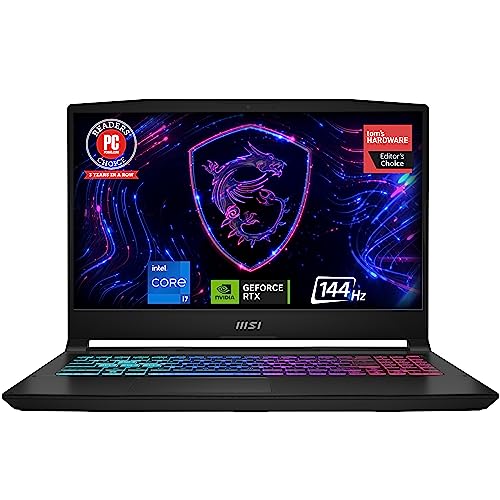 2. MSI Katana 15 (B13VGK-484US) | Check price on Amazon | |
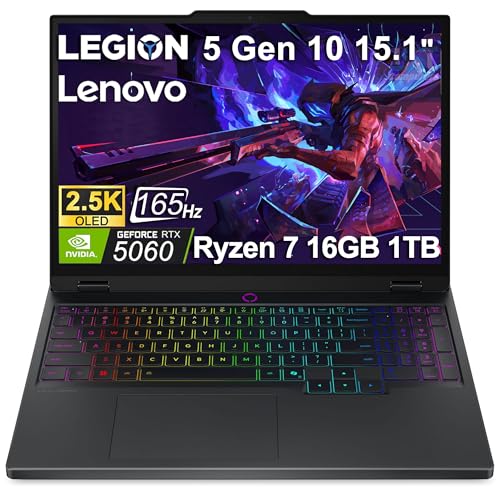 3. Lenovo Legion 5 Gen 10 | Check price on Amazon | |
 4. Acer Nitro V 16S AI (ANV16S-41-R2AJ) | Check price on Amazon |
Key takeaways
- Find the best custom built gaming laptops with configurable CPUs, GPUs, memory, and storage. Compare four upgrade-friendly gaming laptops and learn how to pick the right build.
The best custom built gaming laptops are models sold in multiple factory configurations with room to upgrade memory and storage, so you can match the CPU, GPU, display, and RAM to the games you play. The ASUS ROG Strix G16, MSI Katana 15, Lenovo Legion 5, and Acer Nitro V 16S AI stand out because each one comes in several configurations built around current-generation processors and graphics. Pick the configuration that fits your games first, then plan your memory and storage around it.
What “Custom Built” Means for a Gaming Laptop
A desktop gaming PC can be assembled part by part, but a gaming laptop works differently. The processor and graphics card are soldered to the mainboard in nearly every modern gaming laptop, so those two parts are fixed at the time of purchase. What you can control is which configuration you buy, and in many models you can add memory or swap the storage drive later.
That is why shopping for a custom built gaming laptop is really about choosing the right factory configuration. Manufacturers sell the same chassis with different processors, graphics cards, displays, memory amounts, and storage capacities. Some also run online configurators that let you select a processor, graphics card, memory, storage, display, and operating system before the machine is assembled. Either way, the decisions that matter most are the ones you make before you buy, because the CPU and GPU cannot be changed afterward.
Before choosing, think about the games you play and the resolution you want to play at. Competitive shooters benefit from a high refresh rate display, while open-world and story-driven games benefit from a stronger graphics card and more video memory. Video editing, streaming, and 3D work call for more system memory and a faster processor. A laptop that is right for one of these uses can feel limited for another, so start with your workload and work backward to the hardware.
Cooling matters as much as raw specifications. A powerful graphics card in a thin chassis with weak airflow will run hot and slow down under sustained load. Look for models with dual fans, multiple heat pipes, and rear or side exhaust vents.
The display deserves the same attention as the internals. A 165Hz or 180Hz panel makes fast motion look smoother, and a higher resolution panel shows more detail in open-world games. An OLED panel delivers deeper blacks and stronger contrast, which suits cinematic games and media. Match the display to the graphics card: a top-tier GPU is wasted on a low-resolution, low-refresh panel, and a high-resolution panel needs a strong GPU behind it.
Memory and storage are the two parts you can most often change later. Many gaming laptops ship with two memory slots, so you can add a second stick or replace both. Storage usually sits in an M.2 slot, and many models include a second slot for an extra drive. Buying a model with upgradeable memory and storage keeps your options open and extends the useful life of the machine.
Comparison Table
| Laptop | Processor | Graphics | Display | Memory / Storage |
|---|---|---|---|---|
| ASUS ROG Strix G16 (G614JV-AS74) | Intel Core i7-13650HX | NVIDIA GeForce RTX 4060 | 16-inch, 165Hz | 16GB DDR5 / 1TB PCIe Gen4 SSD |
| MSI Katana 15 (B13VGK-484US) | Intel Core i7-13620H | NVIDIA GeForce RTX 4070 | 15.6-inch FHD IPS, 144Hz | 16GB DDR5 / 1TB NVMe SSD |
| Lenovo Legion 5 Gen 10 | AMD Ryzen 7 260 | NVIDIA GeForce RTX 5060, 8GB | 15.1-inch 2.5K OLED, 165Hz, G-SYNC | 16GB DDR5 / 1TB SSD |
| Acer Nitro V 16S AI (ANV16S-41-R2AJ) | AMD Ryzen 7 260 | NVIDIA GeForce RTX 5060 | 16-inch WUXGA IPS, 180Hz | 32GB DDR5 / 1TB Gen 4 SSD |
1. ASUS ROG Strix G16 (G614JV-AS74)
The ASUS ROG Strix G16 is a strong starting point for a custom built gaming laptop because the Strix line is sold in a wide range of configurations, so you can choose the processor, graphics card, memory, and storage that match your needs. The G614JV-AS74 configuration pairs an Intel Core i7-13650HX processor with an NVIDIA GeForce RTX 4060 graphics card, 16GB of DDR5 memory, and a 1TB PCIe Gen4 SSD, according to its Amazon listing. The 16-inch display runs at 165Hz, which suits fast-paced games where smooth motion matters.
The Core i7-13650HX is a high-performance mobile processor with enough cores to handle gaming alongside streaming, voice chat, and background applications. The RTX 4060 supports real-time ray tracing and DLSS, which helps newer titles run smoothly at 1080p and 1440p. Together, this pairing covers the most popular competitive and open-world games without pushing into the highest tier of hardware.
The 16-inch 165Hz display is a good match for the RTX 4060. Fast refresh rates make aiming and tracking feel more responsive in shooters, and the larger 16-inch panel gives you more screen space than a 15.6-inch display. The laptop includes Wi-Fi 6E for low-latency wireless networking and ships with Windows 11, so it is ready for modern games and applications out of the box.
Memory and storage are practical for a first build. 16GB of DDR5 memory handles current games and everyday multitasking, and the 1TB PCIe Gen4 SSD holds a solid library of games while loading them quickly. If your library grows, an external drive or a storage upgrade can extend the machine later.
If you want a laptop that looks the part and performs well across a wide range of titles, this configuration is a balanced place to start. Check the listing for the exact configuration, since the Strix G16 is sold in many variants and the model number is what confirms which processor and graphics card you are getting.
Check the ASUS ROG Strix G16 on Amazon
2. MSI Katana 15 (B13VGK-484US)
The MSI Katana 15 is a good fit for buyers who want a stronger graphics card without moving to a larger or heavier chassis. The B13VGK-484US configuration pairs an Intel Core i7-13620H processor with an NVIDIA GeForce RTX 4070 graphics card, 16GB of DDR5 memory, and a 1TB NVMe SSD, according to its Amazon listing. The 15.6-inch Full HD IPS display runs at 144Hz, and the laptop includes USB-C connectivity and Windows 11 Home.
The RTX 4070 is the standout part of this configuration. It delivers more graphics headroom than the RTX 4060 class, which helps at 1440p and in demanding open-world titles. The Core i7-13620H keeps up with the GPU in most games, and its ten cores handle multitasking well.
Cooling is a named feature here. MSI equips the Katana 15 with Cooler Boost 5, its dual-fan cooling system, which is designed to keep the processor and graphics card running at full speed during long sessions. Sustained cooling is what separates a laptop that performs well in a short benchmark from one that performs well through a four-hour session, so a purpose-built cooling system is worth having on your checklist.
The 15.6-inch 144Hz IPS display suits competitive play, where a high refresh rate and consistent color matter more than maximum resolution. The 1TB NVMe SSD gives you room for a working library of games, and 16GB of DDR5 memory is the right amount for current titles. The Katana 15 is also sold in other configurations, including versions with different processors and graphics cards, so you can step the build up or down within the same chassis.
If your priority is graphics performance in a portable 15.6-inch body, the Katana 15 B13VGK-484US is a focused choice. Confirm the model number B13VGK-484US on the listing before buying, since Katana 15 variants differ in processor, graphics, display, and storage.
Check the MSI Katana 15 on Amazon
3. Lenovo Legion 5 Gen 10
The Lenovo Legion 5 Gen 10 is the display-led pick in this group. Its Amazon listing describes a 15.1-inch 2.5K OLED display with a 165Hz refresh rate and G-SYNC support, paired with an AMD Ryzen 7 260 processor, an NVIDIA GeForce RTX 5060 graphics card with 8GB of memory, 16GB of DDR5 memory, and a 1TB SSD. The listing also notes a 24-zone RGB backlit keyboard, Wi-Fi 7, and Windows 11 Home.
The OLED panel is what sets this laptop apart. OLED delivers true blacks and vivid color, which makes cinematic games, films, and photo work look richer than on a standard IPS panel. The 2.5K resolution sits between Full HD and 4K, giving you sharper detail without demanding as much from the graphics card as a full 4K panel. The 165Hz refresh rate keeps fast motion smooth, and G-SYNC helps prevent screen tearing by matching the display refresh to the graphics card output.
The RTX 5060 is a current-generation graphics card, and the Ryzen 7 260 is an eight-core processor that reaches up to 5.1 GHz, according to published specifications for this configuration. That pairing handles modern games at 1440p and supports streaming and content creation alongside gaming. 16GB of DDR5 memory and a 1TB SSD round out a configuration that is ready for demanding use without immediate upgrades.
Wi-Fi 7 is a forward-looking inclusion. It supports faster wireless speeds and lower latency on compatible networks, which helps with online gaming and large downloads.
The Legion 5 is sold in several configurations, so the Gen 10 line can be scaled to different needs. If display quality is your top priority and you play cinematic or visually rich games, this OLED configuration is the one to look at first. As with the other laptops here, confirm the exact configuration on the listing, since Legion 5 variants differ in processor, graphics, display, and memory.
Check the Lenovo Legion 5 on Amazon
4. Acer Nitro V 16S AI (ANV16S-41-R2AJ)
The Acer Nitro V 16S AI is the memory-led pick in this group, and it suits buyers who run games alongside heavy multitasking. The ANV16S-41-R2AJ configuration pairs an AMD Ryzen 7 260 processor with an NVIDIA GeForce RTX 5060 graphics card, 32GB of DDR5 memory, and a 1TB Gen 4 SSD, according to its Amazon listing. The 16-inch WUXGA IPS display runs at 180Hz, and the laptop includes Wi-Fi 6 and Windows 11.
32GB of memory is the headline here. Most gaming laptops in this class ship with 16GB, which is enough for current games, but 32GB gives you room to run a game, a browser full of tabs, streaming software, and chat applications at the same time without slowing down. It also future-proofs the machine, since games and applications keep using more memory over time. If you stream, edit video, or work with large files alongside gaming, the extra memory is worth having from the start.
The 180Hz display is the fastest refresh rate in this group. It makes the most difference in competitive shooters and fast-paced action games, where every frame counts. The 16-inch WUXGA IPS panel is bright and responsive, and the RTX 5060 has the power to drive high frame rates at this resolution. The Ryzen 7 260 processor keeps the system balanced, with enough cores for gaming and background work.
The Nitro V 16S AI is part of a newer generation of AI-branded laptops, and the RTX 5060 supports the latest DLSS features, which use AI upscaling to improve frame rates in supported games. The 1TB Gen 4 SSD loads games quickly and holds a reasonable library. Wi-Fi 6 covers wireless networking for online play.
If you want a laptop that is ready for heavy multitasking on day one, without planning a memory upgrade, the ANV16S-41-R2AJ configuration is the most complete starting point in this group. Confirm the model number ANV16S-41-R2AJ on the listing, since the Nitro V 16S AI is sold in several configurations with different processors, graphics cards, memory, and storage.
Check the Acer Nitro V 16S AI on Amazon
How to Choose Your Custom Build
Start with the graphics card, because it decides which games you can play and at what settings. An RTX 4060 covers popular titles at 1080p and 1440p. An RTX 4070 adds headroom for more demanding games at 1440p. An RTX 5060 is a current-generation card with the newest DLSS support. Choose the card for the games you play today, not the games you might play in two years, and remember that the GPU cannot be upgraded later.
Next, pick the processor. A modern eight-core or ten-core processor handles gaming and multitasking well. You do not need the fastest processor available unless you also do video editing, 3D rendering, or heavy streaming. Balance matters more than maximum speed: a mid-range processor with a strong graphics card usually plays games better than a top processor with a weak graphics card.
Then choose the display. A 144Hz or 165Hz panel is a good baseline for gaming, and 180Hz suits competitive players. A higher resolution panel shows more detail but needs a stronger graphics card. An OLED panel gives you the best contrast and color, while an IPS panel gives you consistent viewing angles and solid color at a lower cost.
Memory and storage come last in the decision order, because they are the parts you can most often change later. 16GB of memory is enough for gaming today, and 32GB is better if you multitask heavily or stream. A 1TB SSD is a practical minimum for a gaming library, since modern games take up a large amount of space. If the model you choose has a second memory slot or a second storage slot, you can upgrade later instead of paying for the maximum configuration now.
Finally, check the details that are easy to overlook. Confirm the exact model number on the listing, since the same laptop name can cover many configurations. Check the port selection, including USB-C, HDMI, and Ethernet, against the accessories you already own. Check the weight and battery life if you plan to carry the laptop often. And check the warranty and return terms, since a custom configuration can be harder to exchange than a standard model.
Frequently Asked Questions
What does “custom built gaming laptop” mean?
It means a laptop you configure to your needs rather than buying a single fixed specification. In practice, that means choosing a factory configuration with the processor, graphics card, display, memory, and storage you want, or using a manufacturer’s configurator to select those parts before assembly. True part-by-part assembly is rare for laptops, because the processor and graphics card are soldered in place, so the customization happens at the configuration stage and through later memory and storage upgrades.
Can you upgrade a custom built gaming laptop later?
It depends on the model. Memory and storage are the parts most often upgradeable, since many gaming laptops have two memory slots and one or two M.2 storage slots. The processor and graphics card are almost never upgradeable in a laptop. Before buying, check the manufacturer’s specifications for the exact model to confirm how many memory and storage slots it has and whether they are user-accessible.
How much memory do I need for a custom built gaming laptop?
16GB of DDR5 memory is enough for current games and everyday multitasking. 32GB is a better choice if you stream while you play, edit video, run virtual machines, or keep many applications open at once. Memory is one of the easiest parts to upgrade later in many models, so you can start with 16GB and add more if you need it, as long as the laptop has a free slot.
Is an OLED display worth it on a gaming laptop?
An OLED display is worth it if you play cinematic or visually rich games and value deep blacks and vivid color. OLED panels also tend to have fast response times, which helps with motion clarity. An IPS panel is a good alternative if you want consistent brightness, lower cost, or a higher refresh rate at the same specification level. Either way, match the display resolution and refresh rate to your graphics card so the GPU can drive the panel properly.
Which graphics card should I choose for a custom gaming laptop?
Choose the graphics card for the resolution and refresh rate of your display. An RTX 4060 suits 1080p and 1440p gaming, an RTX 4070 adds headroom for demanding titles at 1440p, and an RTX 5060 brings current-generation features and DLSS support. Check the exact configuration and model number on the listing, since the same laptop name can be sold with different graphics cards.
Disclosure: As an Amazon Associate, we earn from qualifying purchases.