Our Short List of 3
All 5 Picks at a Glance
| Product | Specs | Action |
|---|---|---|
 1. Western Digital WD Red Pro 22TB | Check price on Amazon | |
 2. Western Digital WD Gold 24TB | Check price on Amazon | |
 3. Seagate Exos X20 20TB SAS | Check price on Amazon | |
 4. Toshiba MG Series 22TB | Check price on Amazon | |
 5. Toshiba N300 20TB | Check price on Amazon |
Key takeaways
- The best hard drives for deep archive pair CMR capacity with long warranties and low failure rates. Compare five enterprise and NAS drives for cold storage.
As an Amazon Associate we earn from qualifying purchases.
Deep archive is a different job from everyday storage. The drive is written once, or a handful of times, and then expected to sit quietly for years while still returning every file intact when it is finally called on. Speed matters far less here than recording technology, rated reliability, warranty length, and capacity large enough that an entire collection fits without being scattered across a shelf of small drives. This guide to the best hard drives for deep archive focuses on exactly those qualities, and every pick is a large 3.5-inch internal hard drive using conventional magnetic recording.
Affiliate disclosure: This article contains affiliate links. If you buy through a link on this page, we may earn a commission at no additional cost to you.
What Deep Archive Actually Demands From a Drive
A deep archive drive spends most of its life doing nothing, which sounds easy until the failure modes are considered. Bearings and motors age whether a drive spins or sits. Magnetic patterns can weaken over very long periods. A drive stored badly can suffer from humidity, temperature swings, and knocks that never show up until the day the data is needed. No single drive, however well built, removes those risks, so the hardware choice is only one layer of an archive strategy that should always include at least two copies on separate devices, ideally in separate places.
Within that strategy, the drive itself should be chosen for boring dependability. Enterprise and high-end NAS drives are the natural pool because their manufacturers publish the figures that matter for long service: mean time between failures ratings, annualised failure rate targets, workload ratings, unrecoverable error rates, and warranty terms measured in years rather than months. Consumer desktop drives rarely publish comparable numbers and usually carry shorter warranties, which is why none appear in this guide.
Capacity is the other practical filter. Archive collections grow in one direction, and a 20TB or larger drive holds photo libraries, video masters, disk images, research data, and backup sets that would otherwise need several smaller units. Fewer, larger drives also mean fewer devices to label, store, power up, and check during periodic archive verification.
CMR Versus SMR, and Why It Matters Here
Conventional magnetic recording, shortened to CMR, writes each track without overlapping the next. Shingled magnetic recording, or SMR, overlaps tracks to squeeze out extra capacity, and that overlap makes rewriting slow and unpredictable because neighbouring tracks must be rewritten along with the changed data. For a drive that is filled once and then read occasionally, SMR slowness is less painful than in a busy server, but CMR still has two archive advantages. Large writes complete at a steady, predictable rate, so filling a 20TB drive takes hours rather than stretching unpredictably. And if part of the archive ever needs to be refreshed, reorganised, or partially rewritten, a CMR drive handles that work without the long pauses that shingled designs can produce.
Every drive in this guide is a CMR model. That was a deliberate filter, not an accident of availability, and it is the first specification to check on any drive considered for this role, because some manufacturers have historically sold SMR drives in product lines where buyers did not expect them.
Reading the Reliability Numbers Honestly
Manufacturers quote MTBF figures such as 2.5 million hours for the enterprise drives below. That number is a statistical projection across a large population of drives, not a promise that an individual drive will run for centuries. Its real use is comparative: a drive rated at 2.5 million hours with a low annualised failure rate belongs to a class built and tested for continuous duty, and that class tends to survive archive duty better than a budget line with no published rating at all.
Workload ratings work the same way. A rating of 550TB per year describes how much reading and writing the drive is designed to handle annually. Archive use sits far below that ceiling, which is a good position to be in: a drive loafing well inside its rated envelope is under less stress than one run at its limit. Warranty length is the most concrete figure of all, because it is a commercial commitment. The enterprise and NAS Pro drives here carry five-year limited warranties in their listings, which aligns well with a sensible archive refresh cycle of checking and, where needed, migrating media every few years.
How the Picks Were Chosen
Each drive below meets five tests. It is a 3.5-inch internal hard drive, the same form factor and product type across the whole list. It uses CMR recording. Its capacity is 20TB or more, so a single unit holds a serious archive. Its manufacturer publishes enterprise or NAS Pro class reliability figures, including a long warranty. And it has a verifiable Amazon US listing that is not a renewed or recertified unit, because an archive drive should start its life new, with its full warranty and zero prior power-on hours.
The five drives differ in interface, intended environment, and design emphasis, which gives archive builders a genuine choice rather than five versions of the same decision.
The 5 Best Hard Drives for Deep Archive
1. Western Digital WD Red Pro 22TB
The WD Red Pro 22TB, model WD221KFGX, is a NAS-class drive whose listing reads like an archive specification sheet. It is a 3.5-inch SATA 6 Gb/s drive spinning at 7200 RPM with a 512MB cache and CMR recording. Western Digital lists an MTBF of up to 2.5 million hours and a five-year limited warranty, and the listing specifically names archiving among the drive’s intended uses. A multi-axis shock sensor and dynamic fly height technology are included to protect data when the drive is handled and installed, which matters for archive units that may be moved between a dock, a shelf, and a storage case over their lives. For a single-drive or small-enclosure archive that will be powered up periodically for verification, this is the most straightforward pick in the guide.
View it on Amazon: https://www.amazon.com/dp/B0B5W1CQ8W
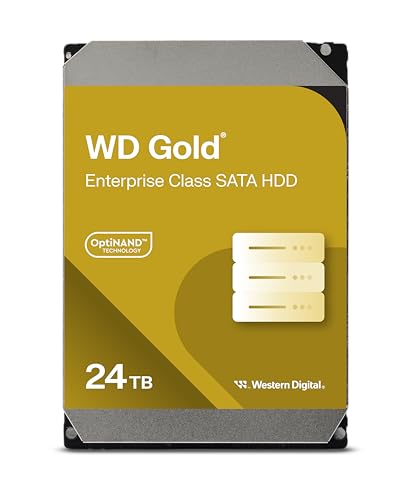
2. Western Digital WD Gold 24TB
The WD Gold 24TB, model WD242KRYZ, is Western Digital’s enterprise-class SATA line, and it brings the largest capacity in this guide. The listing describes a 7200 RPM, SATA 6 Gb/s drive with a 512MB cache, designed for workloads of up to 550TB per year and an MTBF of up to 2.5 million hours for this capacity class. WD Gold drives use OptiNAND technology at the higher capacities, including this 24TB model, and include vibration protection electronics intended for storage systems where several drives work side by side. An archive builder consolidating several older, smaller drives onto one new unit will appreciate the headroom most: fewer devices, one clear label, and an enterprise warranty behind the copy that stays offline.
View it on Amazon: https://www.amazon.com/dp/B0DMB8BV8V
3. Seagate Exos X20 20TB SAS
The Seagate Exos X20 in this listing is the SAS version, model ST20000NM002D, and it suits archive systems built around SAS controllers or enterprise enclosures rather than ordinary SATA ports. Its published figures are firmly enterprise class: 20TB capacity, 7200 RPM, a 256MB cache, an MTBF of 2,500,000 hours, an annualised failure rate of 0.35 percent at full continuous operation, and a nonrecoverable read error rate of one sector per 10E15 bits read. The Exos line is Seagate’s data centre family, built for continuous operation, and the X20 generation uses CMR recording. Buyers should confirm their hardware has a SAS connection before choosing it, because this drive will not plug into a standard SATA-only desktop or dock.
View it on Amazon: https://www.amazon.com/dp/B09MWKN3RN
4. Toshiba MG Series 22TB
Toshiba’s MG Series is its enterprise capacity line, and this 22TB model, MG10AFA22TE, is a 3.5-inch SATA drive built for continuous operation in server and storage systems. Toshiba describes the MG Series as designed for 24/7 operation with a workload of 550TB per year, and the series carries a five-year warranty. The MG10 generation reaches its capacities with a helium-sealed, ten-disk design and Toshiba’s FC-MAMR technology, which uses conventional writing methods, keeping the drive in CMR territory rather than shingled recording. The buffer at this capacity is 512MB. For archive builders who prefer not to put every copy on drives from a single manufacturer, this Toshiba is the natural second-brand choice to pair with a Western Digital or Seagate unit.
View it on Amazon: https://www.amazon.com/dp/B0CN5LBWRD
5. Toshiba N300 20TB
The Toshiba N300 20TB, model HDWG62AXZSTA, is the NAS member of this list, aimed at personal, home office, and small business network storage. Its listing specifies the archive-relevant basics clearly: 20TB capacity, CMR recording, SATA 6 Gb/s, 7200 RPM, and a 512MB cache. That explicit CMR labelling is worth noting, because the ordinary desktop and some NAS lines across the industry have not always been transparent about recording technology. As a drive intended for always-on small NAS systems, it also fits the second common archive pattern, a small network enclosure that holds the working copy of the archive and is itself backed up to an offline drive from this same list.
View it on Amazon: https://www.amazon.com/dp/B0CYQHWXT4
Side-by-Side Comparison
| Drive | Capacity | Interface | Recording | Cache | Class |
|---|---|---|---|---|---|
| WD Red Pro | 22TB | SATA 6 Gb/s | CMR | 512MB | NAS Pro |
| WD Gold | 24TB | SATA 6 Gb/s | CMR | 512MB | Enterprise |
| Seagate Exos X20 | 20TB | SAS 12 Gb/s | CMR | 256MB | Enterprise |
| Toshiba MG Series | 22TB | SATA | CMR | 512MB | Enterprise |
| Toshiba N300 | 20TB | SATA 6 Gb/s | CMR | 512MB | NAS |
Read the table by environment first. SATA drives fit ordinary desktops, docks, and NAS enclosures. The Seagate Exos pick needs SAS hardware. After that, capacity and brand diversity are the useful separators, since the reliability class is deliberately similar across all five.
Archive Habits That Matter More Than the Drive
Keep at least two copies. A single drive is a container, not an archive. Two drives from different manufacturers, such as the WD Gold and the Toshiba MG in this guide, reduce the chance that one product line’s weakness affects every copy.
Verify on a schedule. Power each archive drive up periodically, check its SMART health data, and run checksums against a stored manifest. Finding a problem during a scheduled check is an inconvenience; finding it during an emergency restore is a loss.
Store drives like media, not tools. Keep offline drives in protective cases, in a cool, dry, stable environment, away from magnetic sources and from floors that could flood. Label each drive with its contents, its checksum manifest location, and the date it was written.
Plan the migration, not just the purchase. Hard drives are a medium with a service life, not a permanent vault. A five-year rhythm of checking warranty status, health data, and capacity needs, then migrating to fresh media when any of them points that way, is what turns a pile of drives into an actual deep archive.
Write once, write carefully. Fill an archive drive in one organised pass, verify the copy completely, and only then retire or repurpose the source. Most archive losses happen during hurried transfers, not during quiet storage.
What to Avoid
Avoid SMR drives for this role when a CMR equivalent exists, and check the exact model number rather than trusting a product family name. Avoid renewed, recertified, and pulled-from-service enterprise drives for a primary archive copy, however attractive their capacity looks, because their prior power-on hours and remaining warranty are uncertain. Avoid treating a surveillance drive as an archive drive; those models are tuned for constant video writing, a different workload with different firmware priorities. Finally, avoid the largest mistake of all, which is buying one excellent drive and calling the job done. The drives above are strong, and a single copy on any of them is still a single point of failure.
Verdict
The best hard drives for deep archive are large, CMR, and honestly rated. The WD Red Pro 22TB is the easiest recommendation for a NAS-based archive, the WD Gold 24TB offers the most room in an enterprise SATA package, the Seagate Exos X20 serves SAS systems with published data centre reliability figures, and the Toshiba MG 22TB and N300 20TB give archive builders credible second-brand and NAS options. Choose two from different makers, verify them on a schedule, and the archive has a sound foundation.