Our Short List of 3

- Best for: ATX gaming builds in a compact footprint
- Compact ATX mid-tower, model CC-H52FB-01
- Motherboard support: ATX, Micro-ATX, Mini-ITX
- 2 x 120mm fans included
- Radiator support: up to 360mm front, 240mm top

- Best for: First builds and rebuilds that need wide board compatibility
- Mid-tower ATX case, model CC-9011200-WW
- Motherboard support: Extended ATX, ATX, MicroATX, Mini-ITX
- Materials: alloy steel, plastic, tempered glass
- Two included 120mm fans

- Best for: High-power gaming builds that need airflow first
- Mid-tower case, model LANCOOL 216R-X
- Motherboard support: E-ATX, ATX, Micro-ATX, Mini-ITX
- 2 x 160mm front and 1 x 140mm rear PWM fans pre-installed
- All-around mesh panels
All 5 Picks at a Glance
| Product | Specs | Action |
|---|---|---|
| NZXT H5 Flow 2024 |
| Check price on Amazon |
| Corsair 4000D Airflow |
| Check price on Amazon |
| Lian Li Lancool 216 RGB |
| Check price on Amazon |
 Fractal Design North |
| Check price on Amazon |
 ASUS Prime AP201 |
| Check price on Amazon |
Key takeaways
- Five PC cases on Amazon compared by board size, radiator room, included fans and front ports, from a compact micro-ATX box to full ATX airflow towers.
A PC case is the one part you buy that decides whether everything else fits, stays cool, and goes together without a fight. Pick a box that is too small and a long graphics card or a thick radiator turns the build into a return shipment. Pick one with a sealed front panel and the fans you already own work harder and louder than they should. The case also fixes your desk footprint for years, so the dimensions on the listing matter as much as the cooling layout inside it.
This shortlist is for first-time builders who want a standard ATX board to drop in without surprises, for upgraders moving an existing system into a fresher shell, and for anyone whose desk or living room rules out a full-size tower. Every pick below was chosen from the names and specifications printed on its Amazon listing: motherboard support, radiator limits, fans included in the box, and the ports on the front panel.
Quick Picks
As an Amazon Associate we earn from qualifying purchases.
| Product | Best for | Key spec from title |
|---|---|---|
| NZXT H5 Flow 2024 | Compact ATX gaming builds | 360mm front radiator support, 2 x 120mm fans included |
| Corsair 4000D Airflow | A safe first mid-tower | Tempered glass ATX case with two 120mm fans included |
| Lian Li Lancool 216 RGB | Maximum airflow out of the box | 2 x 160mm and 1 x 140mm PWM fans pre-installed |
| Fractal Design North | Living room and studio desks | Genuine walnut front, two 140mm Aspect PWM fans included |
| ASUS Prime AP201 | Small desks, micro-ATX boards | 33-liter mesh case with 360mm cooler support |
How to Choose
Match the Case to Your Motherboard First
Board support is the hard limit everything else hangs on. A case listed for ATX, Micro-ATX, and Mini-ITX takes the board most builders already own, while a micro-ATX-only case like the AP201 below will never accept a full ATX board later. Check the listing’s motherboard line against the board you have or plan to buy, and note that a few mid-towers, the Lancool 216 among them, stretch to E-ATX. Buying the case around the board, rather than the other way round, avoids the most common rebuild mistake.
Plan Radiator Space and GPU Length Together
Radiator support and graphics card room shrink each other. The Fractal Design North listing states cards up to 355mm fit, but only 300mm once a 360mm front radiator goes in, and that trade appears in some form on nearly every case here. Read the listing for both numbers before you commit: front and top radiator sizes, then the card length that remains with your chosen cooler installed. If you run a big air cooler instead, check its height clearance the same way, because a tall tower cooler can foul a side panel just as easily.
Count the Fans That Actually Ship in the Box
Included fans decide how the build runs on day one and how much more you need to buy. The spread in this list runs from two 120mm fans in the NZXT H5 Flow to the Lancool 216’s pair of 160mm front fans with a 140mm rear, all PWM controlled. Large front fans move air at lower speeds, which keeps noise down, while a case with empty mounts needs extra fans budgeted from the start. Check the listing’s fan count and sizes, then look at how many mounts remain free for later.
Check Front Ports and Cable Room
The front panel is what you touch every day. A USB Type-C port, listed on the NZXT H5 Flow and the Fractal Design North, suits newer phones, drives, and headsets, while older cases may give you USB-A only. Cable room matters just as much: a case with a proper management channel and tie points, as the Corsair and NZXT listings describe, hides the power supply cables behind the tray and keeps the main chamber clear for airflow. Cramped cases with no routing space make even a simple build look tangled through a glass panel.
The 5 Best Options
NZXT H5 Flow 2024
- Best for: ATX gaming builds in a compact footprint
- Compact ATX mid-tower, model CC-H52FB-01
- Motherboard support: ATX, Micro-ATX, Mini-ITX
- 2 x 120mm fans included
- Radiator support: up to 360mm front, 240mm top
ATX gaming builds in a compact footprint
Only two fans are included, so a hot graphics card may need extra fans added later
The 2024 revision of the H5 Flow is the compact ATX pick for builders who want strong airflow without a full-size tower on the desk. Its listing describes a perforated high-airflow design with two 120mm fans included, room for a 360mm radiator at the front and a 240mm radiator at the top, and a tempered glass side panel over a managed cable layout. Because it accepts standard ATX boards in a smaller shell, it suits a gaming build that has to share desk space with monitors and speakers, and it leaves liquid cooling open as an upgrade path.
Corsair 4000D Airflow
- Best for: First builds and rebuilds that need wide board compatibility
- Mid-tower ATX case, model CC-9011200-WW
- Motherboard support: Extended ATX, ATX, MicroATX, Mini-ITX
- Materials: alloy steel, plastic, tempered glass
- Two included 120mm fans
First builds and rebuilds that need wide board compatibility
The listing includes two fans, so heavily loaded builds should plan on filling more mounts
The 4000D Airflow is the steady, no-drama choice for a first build or a rebuild into a cleaner shell. Corsair’s listing describes a high-airflow front panel feeding a spacious interior, a cable management system that routes wires out of sight, and two included 120mm fans behind a tempered glass side panel. Its product information covers an unusually wide range of boards, from Mini-ITX up to Extended ATX, which makes it a forgiving home for parts you already own. If you want one case that simply works with almost any mainstream build plan, this is the default starting point.
Lian Li Lancool 216 RGB
- Best for: High-power gaming builds that need airflow first
- Mid-tower case, model LANCOOL 216R-X
- Motherboard support: E-ATX, ATX, Micro-ATX, Mini-ITX
- 2 x 160mm front and 1 x 140mm rear PWM fans pre-installed
- All-around mesh panels
High-power gaming builds that need airflow first
It is one of the larger mid-towers here, so measure your desk depth before ordering
The Lancool 216 is built around moving air before anything else. Its listing leads with all-around mesh panels and a fan set most cases cannot match: two 160mm PWM fans at the front and a 140mm PWM fan at the rear, pre-installed. The chassis takes boards up to E-ATX, so it swallows large motherboards and long cards that squeeze smaller mid-towers, and a rear PCIe fan bracket adds another cooling trick near the graphics card. For a high-wattage gaming system in a warm room, this is the case here that asks the least extra cooling work from you.
Fractal Design North
- Best for: Living room and home office builds that need to look discreet
- ATX mid-tower, model FD-C-NOR1C-01
- Motherboard support: ATX, mATX, ITX
- Genuine walnut wood front, mesh side panels
- Two 140mm Aspect PWM fans included
Living room and home office builds that need to look discreet
Mesh side panels hide the interior, so builders who want to display components should pick a glass model
The North is the pick when the PC has to sit somewhere guests can see it. Fractal’s listing describes a genuine walnut wood front with brass details, mesh side panels instead of glass, and two included 140mm Aspect PWM fans, so it reads as furniture rather than gaming hardware. Under the calm exterior it is a proper ATX airflow case, with a Type-C USB port on the front and room for cards up to 355mm. Choose it for a living room or studio build where the machine should blend in while still cooling a serious graphics card.
ASUS Prime AP201
- Best for: Compact micro-ATX builds on small desks
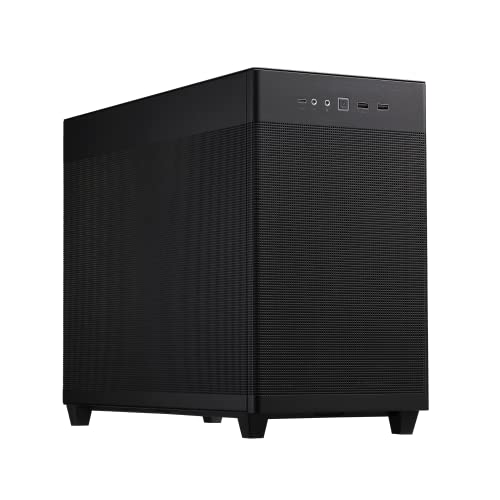
- 33-liter Micro-ATX case, model AP201/BLK/MESH//
- Quasi-filter mesh panels with over 57,000 holes
- Tool-free side panels
- Cooler support: up to 360mm radiators
Compact micro-ATX builds on small desks
Micro-ATX and Mini-ITX boards only, so a full ATX board will not fit
The AP201 shrinks the build without shrinking what fits inside. ASUS lists it as a 33-liter micro-ATX case wrapped in quasi-filter mesh panels with over 57,000 precision-machined holes, and the same listing states support for 360mm coolers and graphics cards up to 338mm long, alongside standard ATX power supplies. Tool-free side panels make it easy to open for cleaning or upgrades, which suits a small desk where the case gets moved and serviced often. It is the natural home for a micro-ATX board and a strong card in a room short on space.
Which One Fits Your Situation
Your First ATX Gaming Build
Start with the Corsair 4000D Airflow or the NZXT H5 Flow 2024. Both take a standard ATX board, include two fans, and keep cable routing simple, which removes most beginner friction. The Corsair fits the wider range of boards, including Extended ATX, while the NZXT is the smaller box and adds a front USB Type-C port. Either leaves room to add fans or a liquid cooler once you know how warm your parts run.
A Small Desk and a Micro-ATX Board
The ASUS Prime AP201 is the clear fit. Its 33-liter shell takes up far less desk than the mid-towers here, yet the listing still allows a 360mm cooler, cards up to 338mm, and a standard ATX power supply, so you are not forced into niche parts. Tool-free panels help in tight spaces too, because the case can be opened and cleaned without clearing a workbench first. Just confirm your board is micro-ATX or Mini-ITX before you commit.
A PC That Lives in the Living Room
Choose the Fractal Design North. The walnut front and mesh sides look like furniture, the two 140mm fans are sized to move air slowly and quietly, and there is no glass panel or lighting demanding attention across the room. It still fits ATX boards and long graphics cards, so a media and gaming machine for the television does not need performance compromises to earn its place next to the sofa.
A Hot Graphics Card in a Warm Room
Take the Lian Li Lancool 216 RGB. Two 160mm front fans and a 140mm rear fan arrive pre-installed, the panels are mesh on all sides, and the chassis has room for large boards and long cards, so airflow does not depend on parts you add later. If your current case traps heat and forces fan speeds up, moving the same hardware into this shell is the most direct fix on this list.
Common Mistakes
- Buying a case before confirming your motherboard size, then finding the board is larger than the case supports.
- Fitting a thick front radiator without rechecking graphics card clearance, which can drop by 50mm or more.
- Assuming every case includes enough fans, when some ship with two and leave the rest of the mounts empty.
- Ignoring the front panel ports, then reaching around the back for a USB Type-C connection the case never had.
- Skipping the case dimensions and discovering the tower is deeper than the desk or shelf it has to sit on.
Frequently Asked Questions
Will a mid-tower case fit an E-ATX motherboard?
Only some of them do. Most mid-towers stop at ATX, so check the motherboard line in the listing rather than assuming. In this list, the Lian Li Lancool 216 and the Corsair 4000D Airflow both state Extended ATX support in their product information, while the NZXT H5 Flow and Fractal Design North top out at standard ATX boards.
How many included fans does a PC case need?
Two fans, one intake and one exhaust, are enough to run a mid-range build, and that is what several cases here include. Systems with a high-wattage graphics card benefit from a third fan or a case like the Lancool 216 that starts with three large PWM fans. What matters is a clear path from front intake to rear exhaust, not the raw count alone.
Can a compact case fit a long graphics card?
Yes, within the limit printed in the listing. The micro-ATX ASUS Prime AP201 accepts cards up to 338mm, which covers most current models, and the Fractal Design North fits 355mm cards in a mid-tower shell. Measure your exact card, including any protruding power connector, and compare it with the case figure before ordering, because a front radiator reduces the space further.
Is a front USB Type-C port worth having?
It is worth it if you plug in modern phones, fast external drives, or USB-C headsets at your desk, since it saves reaching behind the machine. The NZXT H5 Flow 2024 and Fractal Design North list a Type-C port on the front panel. If everything you own still uses USB-A, the port is a convenience rather than a requirement, and an adapter covers the rare exception.