Key takeaways
- Compare the best powered USB hubs with their own AC adapters: 10-port, 7-port and USB-C models for drives, peripherals and steady charging at your desk.
A laptop with two ports becomes a bottleneck once a keyboard, a mouse, an external drive, a headset, and a printer all need a home. A powered USB hub ends that juggling act by turning one port on your computer into several, with its own wall adapter supplying the electricity so every connected device gets stable power at the same time.
Every hub in this guide is powered, which means it ships with its own AC adapter and draws power from a wall outlet rather than from the laptop. That is what sets this roundup apart from the other hub guides on this site. The general best USB hub guide mixes powered desktop models with compact bus-powered hubs that borrow power from the computer, and the best USB-C hub guide covers multiport adapters that run off the laptop port. Here, only hubs with a dedicated adapter made the list, so each pick can run several drives and peripherals together.
As an Amazon Associate, we earn from qualifying purchases.
Table of Contents
- Quick Answer
- How to Choose a Powered USB Hub
- Anker 10-Port USB 3.0 Hub
- TP-Link UH720 Powered USB Hub 3.0
- Atolla 7-Port Powered USB Hub 3.0
- SABRENT 7-Port USB-C Hub HB-3A4C
- SABRENT 10-Port USB 3.0 Hub HB-B7C3
- Frequently Asked Questions
- Conclusion
- Product and ASIN Reference
Quick Answer
For a busy desk, the Anker 10-Port USB 3.0 Hub is the strongest all-round pick in the premium grouping, with seven data ports, three charging ports, and a 60W adapter that keeps everything running at once. The TP-Link UH720 is the mid-range alternative for a similar desk, with seven data ports and two fast charging ports fed by a 12V adapter. The Atolla 7-Port hub is the budget pick for a smaller desk that still wants per-port switches, while the SABRENT HB-3A4C is the premium pick for a modern USB-C laptop, and the SABRENT HB-B7C3 is the mid-range choice for a workstation with the most peripherals.
How to Choose a Powered USB Hub
Start with the adapter, because that is what makes a powered hub different from a bus-powered one. A larger adapter wattage supports more devices at once, so a hub with a 60W adapter handles a desk full of drives and charging phones better than a hub with a small adapter. Check the adapter rating in the specifications, and confirm that the adapter is included in the box.
Count the ports you will use at the same time, and separate data ports from charging ports. Many ten-port hubs have seven data ports and three charging-only ports, so expect seven data connections, not ten. Charging ports are useful for phones and tablets, but they do not transfer files, so count data ports against the keyboard, mouse, drive, printer, and headset that need a live connection to the computer.
Data speed matters for storage. USB 3.0 ports move data at up to 5Gbps, which is fast enough for external hard drives and everyday file transfers, while older USB 2.0 ports are far slower and best left for a keyboard or mouse. Individual power switches are a practical bonus on a busy desk, since they let you switch a drive off without unplugging it or disturbing the rest of the setup. Cable length also matters: a longer host cable gives more freedom to place the hub where it is easy to reach.
Compatibility is rarely a problem, since most powered hubs work with Windows, macOS, and Linux without drivers, but check the listing for your system before ordering. Finally, remember that a powered hub is a desktop device. It needs a wall outlet nearby and a permanent spot on the desk, so it is the wrong choice for a bag, where a compact bus-powered hub fits better.
Anker 10-Port USB 3.0 Hub

The Anker 10-Port USB 3.0 Hub is the desk anchor of this guide. Seven USB 3.0 data ports and three PowerIQ charging ports give a crowded workstation room to breathe, and the included 60W adapter means the hub does not borrow power from the laptop to keep everything running. Data moves at up to 5Gbps, fast enough for external drives and file transfers, and the three charging ports detect each connected device to deliver up to 2.1A per port.
This hub suits a permanent desk where a keyboard, mouse, printer, headset, and drives stay plugged in all day, and built-in surge protection guards the hub and its devices. The trade is simplicity: this mains-powered unit has no USB-C ports or video output, so a laptop with a single USB-C port and an external monitor needs a USB-C adapter or a docking station instead.
Specs
- Ports: 7 USB 3.0 data ports, 3 PowerIQ charging ports
- Data transfer: Up to 5Gbps
- Power: 60W adapter, 12V and 5A
- Charging: Up to 2.1A per charging port
- Dimensions: 5.71 x 1.73 x 0.91 inches
- Weight: 1.07 pounds
- Compatibility: Windows, macOS, Linux
- Extras: Surge protection, 18-month warranty
TP-Link UH720 Powered USB Hub 3.0

The TP-Link UH720 is the value pick among the large powered hubs, with seven USB 3.0 data ports and two smart charging ports fed by a 12V and 4A adapter. Data runs at up to 5Gbps, and the two charging ports deliver up to 2.4A each, so a phone or tablet charges quickly while the data ports handle a keyboard, mouse, drive, and printer. A single power button switches the whole unit on and off.
The UH720 suits a home office that needs more ports than a four-port splitter can give, without paying for the largest hub on the shelf. Overheat, overload, overvoltage, and short-circuit protection plus a built-in surge protector guard connected equipment and data. The hub is plug and play with no drivers required, and it works with Windows, Mac, Chrome OS, and Linux systems. There are no individual port switches, so devices are managed as a group rather than one at a time, and there is no USB-C port or video output.
Specs
- Ports: 7 USB 3.0 data ports, 2 smart charging ports
- Data transfer: Up to 5Gbps
- Power: 12V and 4A adapter
- Charging: Up to 2.4A per charging port
- Controls: Single power on and off button
- Compatibility: Windows, Mac, Chrome OS, Linux
- Extras: Surge, overheat, overload, and short-circuit protection, 2-year warranty
Atolla 7-Port Powered USB Hub 3.0
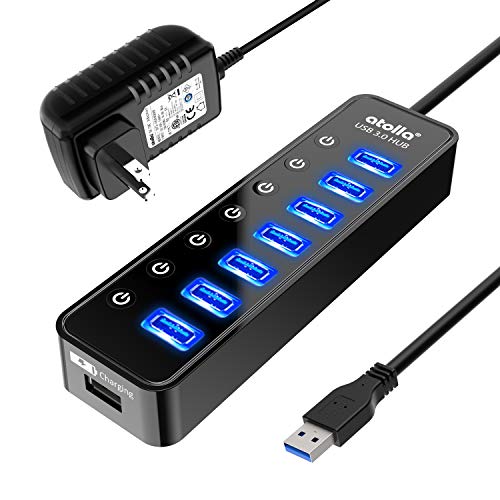
The Atolla 7-Port Powered USB Hub 3.0 is the compact powered pick in this guide. Seven USB 3.0 data ports and one smart charging port give a smaller desk room for the essentials, and the included 5V and 4A adapter keeps the connection stable when several devices run at once. Data moves at up to 5Gbps, and the single charging port delivers up to 2.4A for a phone or tablet while the data ports stay busy.
Where the Atolla stands out is control: every port has its own switch with an LED indicator, so a device can be switched off without unplugging it. The hub cable measures 100cm and the adapter cable 120cm, giving more placement freedom than short leads. The limit is capacity: seven data ports and a 4A adapter suit a moderate desk rather than a workstation loaded with drives.
Specs
- Ports: 7 USB 3.0 data ports, 1 smart charging port
- Data transfer: Up to 5Gbps
- Power: 5V and 4A adapter
- Charging: Up to 2.4A on the charging port
- Controls: Individual on and off switches with LED indicators
- Cable: 100cm hub cable, 120cm adapter cable
- Dimensions: 6.3 x 1.77 x 0.91 inches
- Compatibility: Windows, Mac, Linux
- Extras: 18-month warranty
SABRENT 7-Port USB-C Hub HB-3A4C

The SABRENT 7-Port USB-C Hub HB-3A4C is the modern option in this roundup, built for a laptop whose main port is USB-C. Three USB-A ports and four USB-C ports all run at 5Gbps, and a 48W adapter supplies the hub so connected devices get reliable power instead of sharing what the laptop port can spare. One USB-C port supports 20W Power Delivery, which adds charging flexibility for a compatible device while the other ports handle data.
Each port has its own switch with an LED status light, and the aluminum body suits a desk that gets daily use. The hub works with Windows, macOS, and Linux. Check the host connection before buying: this hub connects through USB-C, so a computer with only USB-A ports needs a different model from this guide.
Specs
- Ports: 3 USB-A ports, 4 USB-C ports
- Data transfer: Up to 5Gbps on all ports
- Power: 48W adapter
- Power Delivery: 20W on one USB-C port
- Controls: 7 individual switches with LED indicators
- Body: Aluminum
- Compatibility: Windows, macOS, Linux
SABRENT 10-Port USB 3.0 Hub HB-B7C3
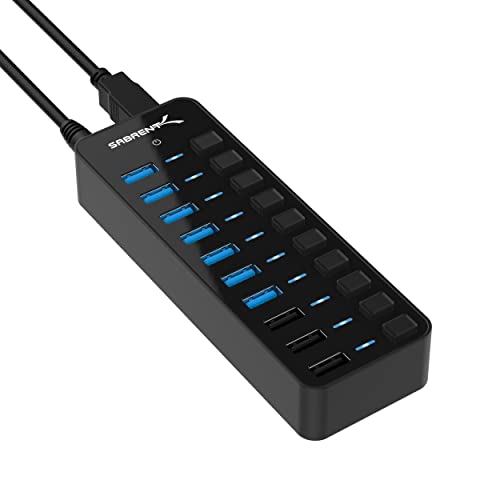
The SABRENT 10-Port USB 3.0 Hub HB-B7C3 matches the Anker port for port, with seven USB 3.0 data ports and three smart charging ports fed by a 60W adapter. Every port has its own power switch with an LED indicator, so a device can be switched off without unplugging it or disturbing the rest of the setup.
Data transfer runs at up to 5Gbps, and the three charging ports deliver up to 2.4A each, with auto-detection for phones and tablets. The aluminum enclosure measures 5.7 x 1.9 x 0.94 inches, and the hub works with Windows, macOS, and Linux without drivers. It is a powered hub, so it needs its adapter plugged in and a spot on the desk, and it has no USB-C data port or video output.
Specs
- Ports: 7 USB 3.0 data ports, 3 smart charging ports
- Data transfer: Up to 5Gbps
- Power: 60W adapter, 12V and 5A
- Charging: Up to 2.4A per charging port
- Controls: Individual power switches with LED indicators
- Body: Aluminum
- Dimensions: 5.7 x 1.9 x 0.94 inches
- Compatibility: Windows, macOS, Linux
- Extras: 1-year warranty
Frequently Asked Questions
What makes a USB hub a powered hub?
A powered hub ships with its own AC adapter and draws electricity from a wall outlet. A bus-powered hub has no adapter and draws all of its power from the laptop port it plugs into, which limits how many power-hungry devices it can run at once. Every hub in this guide includes its own adapter.
Do I need a powered hub for an external hard drive?
An external hard drive is the classic reason to buy a powered hub. Spinning drives and some portable SSDs draw more power than a single laptop port can reliably share across several devices, so a hub with its own adapter keeps the drive connected and stable while a keyboard, mouse, and headset stay plugged in too.
Can a powered hub charge my phone?
Yes, if it has dedicated charging ports. Most hubs in this guide include charging ports that deliver 2.1A or 2.4A per port, which charges a phone or tablet faster than a standard data port. Note that charging ports usually do not transfer data, so a phone plugged into one will charge but will not sync files.
Will a powered USB hub work with my laptop?
Most powered hubs work with Windows, macOS, and Linux without drivers, and they connect through a standard USB-A or USB-C port. Check two things before buying: the host connector on the hub matches a port on your laptop, and the hub has enough data ports for the devices you plan to leave connected at the same time.
Conclusion
A powered USB hub is the right fix when a desk has outgrown the ports on the computer itself. The Anker 10-Port hub is the strongest all-round pick for a busy desk, the TP-Link UH720 gives similar capacity in the mid-range grouping, and the Atolla 7-Port hub covers a smaller desk with per-port switches in the budget grouping. The SABRENT HB-3A4C brings powered expansion to a USB-C laptop, while the SABRENT HB-B7C3 gives a workstation the most ports and the most control. Pick the hub whose port count, adapter size, and host connector match your desk.
Product and ASIN Reference
| Product | ASIN | Tier |
|---|---|---|
| Anker 10-Port USB 3.0 Hub | B00VDVCQ84 | Live (cached crawl) |
| TP-Link UH720 Powered USB Hub 3.0 | B00SCX6I8A | Live (cached crawl) |
| Atolla 7-Port Powered USB Hub 3.0 | B07G8CMR18 | Search-indexed |
| SABRENT 7-Port USB-C Hub HB-3A4C | B0CXZ448XL | Search-indexed |
| SABRENT 10-Port USB 3.0 Hub HB-B7C3 | B0797NWDCB | Search-indexed |