Our Short List of 3

- Best for: A family desk that needs printing, copying, scanning, and fax in one compact machine.
- Type: Color inkjet all-in-one
- Functions: Print, copy, scan, fax
- Print speed: 8.8 ipm black, 4.4 ipm color
- Print resolution: Up to 4800 x 1200 dpi

- Best for: Homes that print black text, forms, and labels, and want a printer that stays ready through long idle stretches.
- Type: Monochrome laser, print only
- Print speed: Up to 30 ppm black
- Print resolution: Up to 1200 x 1200 dpi
- Paper capacity: 250-sheet tray, single-sheet manual feed

- Best for: A home that wants an easy HP all-in-one with a document feeder for school forms and paperwork.
- Type: Color inkjet all-in-one
- Functions: Print, copy, scan, mobile fax
- Print speed: Up to 8.5 ppm black, 5.5 ppm color
- Paper capacity: 60-sheet input tray, 25-sheet output tray, 35-page automatic document feeder
All 5 Picks at a Glance
| Product | Specs | Action |
|---|---|---|
| 1. Canon PIXMA TR4720 |
| Check price on Amazon |
| 2. Brother HL-L2405W |
| Check price on Amazon |
| 3. HP DeskJet 4155e |
| Check price on Amazon |
 4. Brother DCP-L2640DW |
| Check price on Amazon |
 5. Canon PIXMA MG3620 |
| Check price on Amazon |
Key takeaways
- Compare the best light duty printers for occasional home printing, from compact inkjets to small lasers, and pick a model that fits low-volume use.
A light duty printer suits a home where printing happens a few times a week: school forms, boarding passes, shipping labels, a recipe, a photo now and then. These machines are small, simple to set up, and built for low monthly volume rather than a busy office. The five picks below cover the two main paths for occasional printing: a compact inkjet all-in-one for color and scanning, and a small monochrome laser for black text that never dries out.
Disclosure: As an Amazon Associate, we earn from qualifying purchases.
Quick Picks
The Canon PIXMA TR4720 is the most complete all-in-one for a family desk, with fax and a document feeder. The Brother HL-L2405W is the pick for homes that print mostly black text and want toner that never dries out. The HP DeskJet 4155e is the straightforward HP all-in-one with a feeder and mobile fax. The Brother DCP-L2640DW is the laser all-in-one, adding copying and scanning to fast black printing. The Canon PIXMA MG3620 is the simple, long-running inkjet for basic color printing, copying, and scanning.
| Printer | Type | Functions | Print speed | Paper capacity | Connectivity |
|---|---|---|---|---|---|
| Canon PIXMA TR4720 | Color inkjet | Print, copy, scan, fax | 8.8 ipm black, 4.4 ipm color | 100 sheets | Wi-Fi, USB, mobile |
| Brother HL-L2405W | Mono laser | Print only | Up to 30 ppm black | 250 sheets | Wi-Fi, USB |
| HP DeskJet 4155e | Color inkjet | Print, copy, scan, mobile fax | 8.5 ppm black, 5.5 ppm color | 60 sheets | Wi-Fi, USB, mobile |
| Brother DCP-L2640DW | Mono laser | Print, copy, scan | Up to 36 ppm black | 250 sheets | Wi-Fi, Ethernet, USB |
| Canon PIXMA MG3620 | Color inkjet | Print, copy, scan | 9.9 ipm black, 5.7 ipm color | 100 sheets | Wi-Fi, mobile |
How to Choose
Match the duty cycle to your real volume. Duty cycle is the maker’s stated ceiling for monthly pages, and it is the clearest line between light duty and office hardware. A light duty printer is designed for a few hundred pages a month at most, often far fewer. Check the recommended monthly volume on the spec sheet, not just the maximum duty cycle, because the maximum is a ceiling the machine can survive, not a pace it enjoys. If your household prints a school packet on Monday, a return label on Wednesday, and a dozen pages on the weekend, any of the five picks below has ample headroom.
Ink vs laser for occasional use. This is the decision that matters most for a printer that sits idle. Inkjet ink is liquid, and a cartridge that goes unused for weeks can dry at the nozzles, which leads to streaky output and cleaning cycles that use more ink. A laser printer uses dry toner powder, so nothing dries out between jobs. A laser that sits untouched for two months prints the same crisp first page as it did on day one. For that reason, a small monochrome laser is often the better buy for a home that prints text only and prints it rarely. Ink still wins when color matters: family photos, school projects with color charts, and craft printables all need an inkjet. If you go the ink route, print a small color page every week or two to keep the nozzles moving.
Connectivity and setup. Every pick below prints over Wi-Fi, and that is the baseline to demand. A printer that only works over USB ties one computer to one desk. Wi-Fi printing lets a phone, a tablet, and a laptop all send jobs, and mobile printing apps make it possible to print a boarding pass from the couch. Look for AirPrint and Mopria support if the household mixes iPhone and Android devices, since those let phones print without a maker app.
Paper handling and size. A 100-sheet tray is plenty for occasional printing, and two of the inkjets here carry one. The lasers carry larger 250-sheet trays, which means fewer refills, but tray size is a convenience, not a deciding factor, at low volume. An automatic document feeder is worth having if you scan or copy multi-page documents, even rarely, because feeding pages one at a time gets old fast. Measure the shelf or desk before buying: a compact laser is often smaller than an inkjet all-in-one, and the footprint numbers in the specs below are the honest check.
Ink and toner costs over time. Running cost is the quiet part of printer ownership. A cartridge inkjet costs little to buy and more per page, because each cartridge holds a modest amount of ink. A laser sits in the middle: a toner cartridge prints a large number of black pages, and a high-yield cartridge stretches that further. For a home printing a few dozen pages a month, the difference between these paths is small in absolute terms, so do not let running cost override the ink-versus-laser decision.
5 Best Options
1. Canon PIXMA TR4720
- Best for: A family desk that needs printing, copying, scanning, and fax in one compact machine.
- Type: Color inkjet all-in-one
- Functions: Print, copy, scan, fax
- Print speed: 8.8 ipm black, 4.4 ipm color
- Print resolution: Up to 4800 x 1200 dpi
A family desk that needs printing, copying, scanning, and fax in one compact machine.
It is a cartridge inkjet, so a long idle stretch can dry the nozzles. Print a small color page every week or two to keep it healthy, and keep in mind that color printing runs at about half the black speed.
The PIXMA TR4720 is the most complete all-in-one in this list, and the best fit for a family desk that needs to do a bit of everything. It prints, copies, scans, and faxes, and its 35-page automatic document feeder turns a stack of school forms into a single job instead of a series of flatbed scans. Black text prints at 8.8 images per minute and color at 4.4, which is unhurried but fine for a home that prints in short bursts. Print resolution reaches 4800 x 1200 dpi, so color documents and borderless photos come out clean. The 100-sheet input tray suits low-volume use, and auto two-sided printing keeps longer documents tidy. Wi-Fi, USB, and mobile printing cover every device in the house.
Watch out for: It is a cartridge inkjet, so a long idle stretch can dry the nozzles. Print a small color page every week or two to keep it healthy, and keep in mind that color printing runs at about half the black speed.
2. Brother HL-L2405W
- Best for: Homes that print black text, forms, and labels, and want a printer that stays ready through long idle stretches.
- Type: Monochrome laser, print only
- Print speed: Up to 30 ppm black
- Print resolution: Up to 1200 x 1200 dpi
- Paper capacity: 250-sheet tray, single-sheet manual feed
Homes that print black text, forms, and labels, and want a printer that stays ready through long idle stretches.
It prints black only and has no scanner, copier, or automatic two-sided printing, so color documents and copying need a second device. At 15.1 lb it is also fairly heavy for a print-only machine, so pick its spot before unboxing it.
The Brother HL-L2405W is the pick for a home that prints mostly black text and wants the printer to simply work after weeks of silence. It is a monochrome laser, so its toner is a dry powder that never dries out, and the first page after a long idle stretch looks the same as the last one before it. It prints at up to 30 pages per minute, with a first page out in about 8.5 seconds. The 250-sheet tray is the largest in this list, which means fewer refills, and a manual feed slot handles envelopes and specialty paper. Connectivity covers dual-band Wi-Fi and USB, plus mobile printing through the Brother app, AirPrint, and Mopria. It uses TN830 standard or TN830XL high-yield toner, with its own DR830 drum unit good for about 15,000 pages.
Watch out for: It prints black only and has no scanner, copier, or automatic two-sided printing, so color documents and copying need a second device. At 15.1 lb it is also fairly heavy for a print-only machine, so pick its spot before unboxing it.
3. HP DeskJet 4155e
- Best for: A home that wants an easy HP all-in-one with a document feeder for school forms and paperwork.
- Type: Color inkjet all-in-one
- Functions: Print, copy, scan, mobile fax
- Print speed: Up to 8.5 ppm black, 5.5 ppm color
- Paper capacity: 60-sheet input tray, 25-sheet output tray, 35-page automatic document feeder
A home that wants an easy HP all-in-one with a document feeder for school forms and paperwork.
The 60-sheet tray needs refilling more often than the 100-sheet trays here, and as a cartridge inkjet it needs a short print every week or two during idle stretches. One recent listing summary calls this model discontinued, though HP’s own store page still lists it; confirm availability before buying.
The HP DeskJet 4155e is the straightforward HP all-in-one for a home that wants print, copy, and scan without a learning curve. It prints at up to 8.5 pages per minute in black and 5.5 in color, and its 35-page automatic document feeder makes multi-page copying and scanning far less tedious than a flatbed-only machine. The 60-sheet input tray is the smallest here, which fits its brief: this is a printer for a few pages at a time, not a ream a week. Dual-band Wi-Fi, USB, and the HP Smart app cover phones, tablets, and laptops, and it can send a mobile fax from the app, a handy extra for forms and paperwork. It uses HP 67 black and tri-color cartridges.
Watch out for: The 60-sheet tray needs refilling more often than the 100-sheet trays here, and as a cartridge inkjet it needs a short print every week or two during idle stretches. One recent listing summary calls this model discontinued, though HP’s own store page still lists it; confirm availability before buying.
4. Brother DCP-L2640DW
- Best for: A home that wants laser reliability plus copying and scanning, especially multi-page documents through the feeder.
- Type: Monochrome laser all-in-one
- Functions: Print, copy, scan
- Print speed: Up to 36 ppm black
- Print resolution: Up to 1200 x 1200 dpi
A home that wants laser reliability plus copying and scanning, especially multi-page documents through the feeder.
It is the largest and heaviest printer in this list at 25 lb, so it needs a fixed, sturdy spot with room to lift the scanner lid. It prints black only, and the feeder scans one side at a time.
The Brother DCP-L2640DW is the laser all-in-one of this list: the same fast 36-page-per-minute mono engine as Brother’s best-selling print-only laser, plus a flatbed scanner, a copier, and a 50-page automatic document feeder. That feeder is the reason to pick it over the print-only Brother above, because it turns a stack of pages into one scan or copy job. Print resolution reaches 1200 x 1200 dpi, auto two-sided printing is included, and the 250-sheet tray keeps refills rare. Connectivity covers dual-band Wi-Fi, Wi-Fi Direct, Ethernet, and USB, plus mobile printing through the Brother app, AirPrint, and Mopria. It uses TN830 or TN830XL toner with its own DR830 drum unit, and Brother lists a recommended monthly volume of up to 2,500 pages.
Watch out for: It is the largest and heaviest printer in this list at 25 lb, so it needs a fixed, sturdy spot with room to lift the scanner lid. It prints black only, and the feeder scans one side at a time.
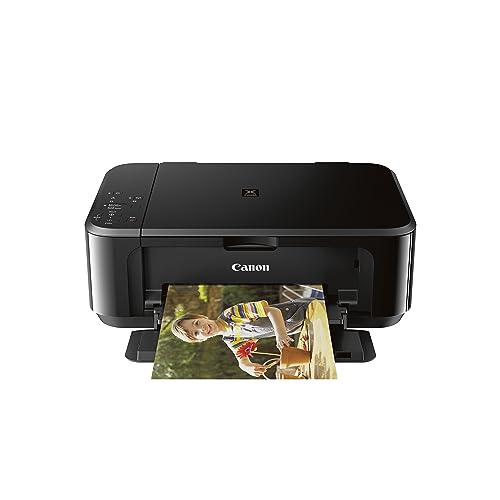
5. Canon PIXMA MG3620
- Best for: A home that wants a basic, proven color all-in-one for documents, copies, and the occasional photo.
- Type: Color inkjet all-in-one
- Functions: Print, copy, scan
- Print speed: 9.9 ipm black, 5.7 ipm color
- Print resolution: Up to 4800 x 1200 dpi
A home that wants a basic, proven color all-in-one for documents, copies, and the occasional photo.
It is an older design with no display screen and no document feeder, so multi-page copying means lifting the lid for each page. As a cartridge inkjet, it also needs a short print every week or two during idle stretches.
The Canon PIXMA MG3620 is the simplest printer in this list, and that is its appeal. It is a color inkjet all-in-one that prints, copies, and scans, with wireless printing from phones, tablets, and laptops through the Canon PRINT app, AirPrint, and Mopria. Black pages print at 9.9 images per minute and color at 5.7, with resolution up to 4800 x 1200 dpi, so everyday documents and the occasional photo both come out well. Auto two-sided printing is included, which is a pleasant surprise at this level, and the 100-sheet input tray fits low-volume use. It uses PG-240 black and CL-241 color cartridges, and the model has been on sale for years without being discontinued by the maker, which means cartridges and support remain easy to find.
Watch out for: It is an older design with no display screen and no document feeder, so multi-page copying means lifting the lid for each page. As a cartridge inkjet, it also needs a short print every week or two during idle stretches.
Which One Fits
Pick by what you print, not by the spec sheet. If your household prints color documents, schoolwork, and photos, and you want copying and scanning too, the Canon PIXMA TR4720 covers the most ground, with the HP DeskJet 4155e as the alternative when a feeder and mobile fax matter more, and the PIXMA MG3620 as the simpler option. If your printing is almost all black text — forms, labels, homework, boarding passes — a laser is the calmer choice, because toner never dries out: take the Brother HL-L2405W for print-only speed, or the Brother DCP-L2640DW if you also need to copy and scan multi-page documents.
Common Mistakes
The most common mistake is buying an office-class printer for a home that prints a few pages a week. A big workgroup laser costs more, takes up more space, and its capacity goes unused. The second mistake is the opposite: buying the cheapest cartridge inkjet and then leaving it untouched for two months, which dries the nozzles and wastes the ink you saved. If you print rarely, a laser handles idle time better. A third mistake is ignoring the footprint: measure the desk or shelf first, because an all-in-one that does not fit ends up on the floor, where dust and bumps shorten its life. A fourth mistake is forgetting the phone in the household. If everyone prints from a phone, a printer without solid mobile support becomes a chore, so check for AirPrint, Mopria, or the maker’s app before buying.
FAQ
Is a laser printer better than an inkjet for occasional printing?
For black text, yes, most of the time. A laser uses dry toner powder, so nothing dries out while the printer sits idle, and the first page after a long break prints cleanly. An inkjet suits homes that need color, photos, or scanning, but it asks for a short print every week or two to keep the nozzles clear. If you print only a few black pages a month, a small laser is the lower-maintenance choice.
How many pages a month counts as light duty?
There is no single line, but a household printing a few dozen to a few hundred pages a month is firmly in light duty territory. The practical test is simpler: if the printer sits idle for days at a time and a 100-sheet tray lasts weeks, your volume is light. Check the recommended monthly volume on the spec sheet and make sure your real use sits well below it, with room to spare.
Do light duty printers work with phones and tablets?
Yes. Every printer in this list prints over Wi-Fi from a phone or tablet, either through the maker’s app or through AirPrint on iPhone and iPad and Mopria on Android. Wi-Fi Direct on some models lets a phone print even when the home network is down. A printer with only a USB connection cannot do this, so wireless support is worth confirming before you buy.
Why does my inkjet printer print streaky pages after sitting unused?
Liquid ink dries at the print nozzles when a cartridge goes unused for weeks, and the dried ink blocks some nozzles, which shows up as streaks or missing colors. Running the printer’s cleaning cycle usually clears it, though it uses ink. The habit that prevents it is simple: print a small color page every week or two. If your printer will sit unused for months at a time, a laser printer avoids the problem entirely, because toner is a dry powder.