Key takeaways
- Compare five laptop cooling pads for gaming, work, and school, from quiet five-fan mats to a single large-fan pad, and find the right fit for your laptop.
As an Amazon Associate, we earn from qualifying purchases.
Short Answer
The best laptop cooling pad for most people is the TopMate C11, with six fans spread across the full base, five height settings, RGB lighting, and a built-in phone holder for 15.6 to 17.3 inch laptops. For smaller laptops, the TopMate C5 adds an LCD speed controller and five fans in a compact frame that fits 12 to 15.6 inch machines. The Cooler Master NotePal X3 takes a different approach with one large 200mm fan and a front vent that keeps hands cool, while the Targus Chill Mat AWE55US is the pick for lap and couch use thanks to its soft neoprene base. The AICHESON S035 rounds out the list with five fans and four height settings for laptops up to 17.3 inches.
Table of Contents
- Short Answer
- How to Choose a Laptop Cooling Pad
- Quick Comparison
- TopMate C11
- TopMate C5
- Cooler Master NotePal X3
- Targus Chill Mat AWE55US
- AICHESON S035
- Frequently Asked Questions
- Conclusion
How to Choose a Laptop Cooling Pad
Start with size. A pad that is smaller than your laptop leaves the edges unsupported and the vents uncovered, while a pad built for a 17 inch machine can feel oversized under a 13 inch ultrabook. Pick a pad rated for that size or larger.
Next, look at the fan layout. A single large fan moves a broad column of air and tends to run quieter, which suits laptops with one central intake. Several smaller fans spread airflow across the whole base, which helps laptops with vents scattered along the bottom panel. Neither layout is better in every case; the right one depends on where your laptop draws air in.
Noise is the next trade-off. Fans that spin faster move more air and make more sound, so a pad with a speed controller is worth having if you take calls or work in shared rooms. A speed control lets you drop the speed when the laptop is idling and raise it during heavy work. Height adjustment helps too: raising the rear opens a gap for air underneath and lifts the screen toward eye level, so look for at least three height settings.
Finally, check the extras. A built-in USB hub keeps you from losing a port to the pad itself, since most pads draw power from the laptop. A phone holder, anti-slip stops, and rubber feet all add everyday value.
Quick Comparison
| Cooling Pad | Fans | Fits Laptops Up To | Height Settings | Tier |
|---|---|---|---|---|
| TopMate C11 | 6 | 17.3 inches | 5 | Mid-range |
| TopMate C5 | 5 | 15.6 inches | 5 | Budget |
| Cooler Master NotePal X3 | 1 (200mm) | 17 inches | Fixed tilt | Mid-range |
| Targus Chill Mat AWE55US | 2 | 17 inches | Fixed | Budget |
| AICHESON S035 | 5 | 17.3 inches | 4 | Budget |
TopMate C11

The TopMate C11 is the most versatile pad in this roundup. Six fans sit across the base: two larger 110mm fans at the top and four smaller 90mm fans in the middle, so air reaches the full underside of the laptop rather than one hot spot. Fan speed runs from 1,250 to 2,400 RPM across five speed settings, which gives you room to balance cooling against noise.
The frame fits laptops from 11 to 17.3 inches, which covers nearly every mainstream notebook, and five height settings let you raise the screen to a comfortable viewing angle. RGB lighting runs along the sides with seven lighting modes, and a detachable phone holder keeps a phone upright for messages or video calls.
Two USB ports sit on the back, so the pad does not cost you a port on the laptop. The C11 is a mid-range pad, and it is the best choice for most buyers who want strong coverage, flexible height, and a few thoughtful extras in one package.
Specs
- Fans: 6 (2 x 110mm, 4 x 90mm)
- Fan speed: 1,250 to 2,400 RPM, 5 speed settings
- Fits laptops: 11 to 17.3 inches
- Height settings: 5
- Lighting: RGB, 7 modes
- Extras: Detachable phone holder, 2 USB ports
- Weight: 2.42 pounds
- Model: C11-CA
- Tier: Mid-range
TopMate C5

The TopMate C5 is the best pick for smaller laptops, and it stands out for its LCD controller. Five fans sit under the laptop: one large central fan and four smaller corner fans, spinning at up to 2,500 RPM. A small LCD screen on the front shows the fan speed, and a control panel switches between three fan modes and six wind speeds.
The pad fits laptops from 12 to 15.6 inches, and five height settings raise the rear for better airflow and a more comfortable typing angle. Two USB ports on the back let you connect a mouse without unplugging the pad. The LCD screen is the feature that sets the C5 apart: you can see the fan speed at a glance and adjust it without guessing. The C5 is a budget pad, and it is the right choice when you want visible control over cooling in a compact frame.
Specs
- Fans: 5 (1 large center fan, 4 small fans)
- Fan speed: Up to 2,500 RPM
- Fan modes: 3 modes, 6 wind speeds
- Fits laptops: 12 to 15.6 inches
- Height settings: 5
- Controls: LCD screen with button panel
- Lighting: Blue LED
- Extras: 2 USB ports
- Tier: Budget
Cooler Master NotePal X3

The Cooler Master NotePal X3 proves that one fan can be enough when it is big enough. A single 200mm fan sits in the center of a metal mesh base, pushing 65 to 76.5 CFM of air upward at speeds from 500 to 850 RPM. The large fan moves a wide column of air at low speed, which keeps noise between 16 and 23 dBA, quieter than most multi-fan pads at full speed. A dial on the front controls fan speed, so you can turn it down for light work and up for heavy loads.
The X3 has a feature no other pad here offers: a front vent that blows a gentle breeze across your hands while you type or play. There is no adjustable height, and it has a single USB pass-through rather than a full hub. The X3 is a mid-range pad, and it is the best choice for anyone who wants strong, quiet airflow from a single large fan.
Specs
- Fans: 1 (200mm with blue LEDs)
- Fan speed: 500 to 850 RPM
- Airflow: 65 to 76.5 CFM
- Noise level: 16 to 23 dBA
- Fits laptops: Up to 17 inches
- Controls: Front dial wheel for fan speed
- Extras: Front vent for hand cooling, USB pass-through
- Weight: 1.98 pounds
- Model: R9-NBC-NPX3-GP
- Warranty: 2-year manufacturer warranty
- Tier: Mid-range
Targus Chill Mat AWE55US
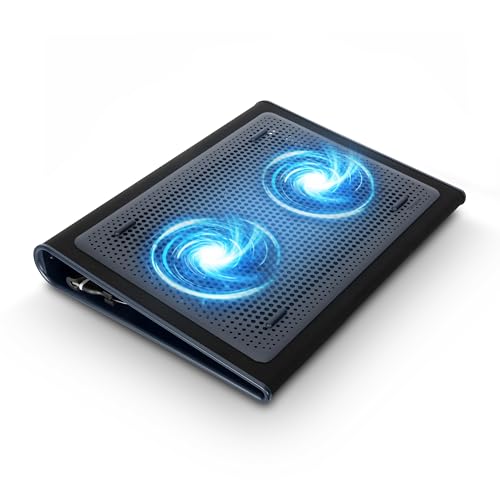
The Targus Chill Mat AWE55US is built for the lap, and that is where it beats every other pad here. A soft neoprene base cushions the pad against your legs and blocks heat from reaching you, while an open plastic grid on top holds the laptop steady. Two 75mm fans spin at 1,900 RPM and push warm air away from the laptop base, and four rubber stops keep the laptop from sliding while you type.
The mat fits most laptops up to 17 inches and measures 15 by 11.75 inches, so it works on a desk too, but the flat bottom and soft underside suit couch and bed use. The USB-A power cord is built in and tucks into a small storage compartment underneath. It has no height adjustment or speed control, but it offers comfort and portability instead. The Chill Mat is a budget pad, and it is the best choice for anyone who works from the couch, the bed, or anywhere without a desk.
Specs
- Fans: 2 (75mm)
- Fan speed: 1,900 RPM
- Fits laptops: Up to 17 inches
- Base: Soft neoprene, flat bottom for lap use
- Power: USB-A, built-in cord with storage compartment
- Dimensions: 15 x 11.75 inches
- Weight: 1.99 pounds
- Extras: 4 rubber laptop stops
- Model: AWE55US
- Warranty: Limited one-year warranty
- Tier: Budget
AICHESON S035

The AICHESON S035 is the best value pick for large laptops, pairing five fans with a wide frame at a budget tier. One large central fan spins at 1,000 to 1,500 RPM while four smaller fans run at 2,600 to 3,000 RPM, so the pad covers the whole base of laptops up to 17.3 inches.
Four height settings raise the laptop to a comfortable angle, and a flip-up metal bar at the bottom stops the laptop from sliding forward when the pad is tilted. A dial controls fan speed and the blue LED lights, which brighten as the fans spin faster. Two USB ports sit on the side, and a USB-to-USB cable about 1.5 feet long comes in the box for power. The S035 measures about 16.5 by 11.5 inches, which gives even a 17 inch laptop full support with no overhang. The S035 is a budget pad, and it is the right choice when you want five-fan coverage for a large laptop without moving into a higher tier.
Specs
- Fans: 5 (1 large fan, 4 small fans)
- Fan speed: 1,000 to 1,500 RPM (large fan), 2,600 to 3,000 RPM (small fans)
- Fits laptops: Up to 17.3 inches
- Height settings: 4
- Surface: Wave metal mesh
- Controls: Dial for fan speed and LED brightness
- Lighting: Blue LED
- Extras: 2 USB ports, flip-up anti-slip bar, USB cable included
- Dimensions: About 16.5 x 11.5 x 1.1 inches
- Model: S035
- Tier: Budget
Frequently Asked Questions
Do laptop cooling pads actually work?
A cooling pad helps when a laptop draws air from its base, which most laptops do. The fans push cool air toward the intake vents and the raised angle opens space for warm air to escape, which can keep the laptop from slowing down under sustained load. Results vary by laptop design: open bottom intakes benefit most.
How many fans should a laptop cooling pad have?
More fans are not always better. One large fan moves a broad stream of air quietly and suits a single central intake. Five or six smaller fans spread air across the whole base and suit vents spread along the bottom. Check where your laptop takes in air, then pick the layout that lines those vents up with fans.
Will a cooling pad make my laptop quieter?
It often does. When a laptop runs cooler, its internal fans do not need to spin as fast, so the laptop itself gets quieter. The pad adds its own fan noise, so the total sound depends on the pad. A pad with a speed control lets you find the balance between airflow and added noise.
What size cooling pad should I buy for my laptop?
Buy a pad rated for your laptop screen size or one step larger. A 15.6 inch laptop fits pads rated for 15.6 inches and up, while a 17 inch laptop needs a pad rated for 17 or 17.3 inches. Leave a little margin so the whole base sits on the pad with no overhang.
Conclusion
The TopMate C11 is the best all-round choice, with six fans, five height settings, and a phone holder for laptops up to 17.3 inches. The TopMate C5 is the best compact option, with an LCD controller and five fans for laptops up to 15.6 inches. The Cooler Master NotePal X3 is the best single-fan pad, with a quiet 200mm fan and a front vent that keeps hands cool. The Targus Chill Mat AWE55US is the best pad for lap and couch use, with a soft neoprene base and dual fans. The AICHESON S035 is the best budget pick for large laptops, with five fans and four height settings for machines up to 17.3 inches. Check your laptop size, match the fan layout to your vents, and pick the pad that fits how you work.