Key takeaways
- Looking for the best home projectors for 500 dollars? Compare these native 1080p picks from Epson, Optoma and BenQ for movies, sports and gaming at home.
The mid-range home projector class is where a living room or den setup stops feeling like a compromise. Native 1080p resolution is standard at this level, brightness is high enough to hold up against some ambient light, and the better models add gaming-friendly input lag figures and proper color brightness that budget mini projectors cannot match. The trade-off is that these are still lamp-based machines with built-in speakers that do a serviceable job rather than a great one, so the choice comes down to how you balance brightness, contrast, and gaming speed against the room you actually have.


This guide is for buyers setting up a first serious movie, sports, or casual gaming screen at home. Every pick below was chosen from its Amazon listing name and published specifications only: native resolution, lumen output, contrast ratio, inputs, and gaming features. All four projectors here are native 1080p models from established brands, but they split into two camps — Epson’s 3LCD designs, which rate color and white brightness equally, and the DLP models from Optoma and BenQ, which lean harder into contrast and fast response for games.
Quick Picks
Our Short List of 3
- Best for: First-time buyers who want one projector for movies, TV, and sports in a room that is not fully dark.
- Brand: Epson
- Model: Home Cinema 880 (V11H979020)
- Resolution: Native 1080p (1920×1080), 3-chip 3LCD
- Brightness: 3,300 lumens color and white brightness
- Best for: A semi-permanent family room setup with two sources connected and a slightly larger screen.
- Brand: Epson
- Model: Home Cinema 1080 (V11H980020)
- Resolution: Native 1080p (1920×1080), 3-chip 3LCD
- Brightness: 3,400 lumens color and white brightness

- Best for: Dark-room movie nights and console gaming on a very large screen.
- Brand: Optoma
- Model: HD146X
- Resolution: Native 1080p (1920×1080), single-chip DLP
- Brightness: 3,600 lumens
All 4 Picks at a Glance
| Product | Specs | Action |
|---|---|---|
| Epson Home Cinema 880 3-Chip 3LCD 1080p Projector (V11H979020) |
| Check price on Amazon |
| Epson Home Cinema 1080 3-Chip 3LCD 1080p Projector (V11H980020) |
| Check price on Amazon |
| Optoma HD146X High Performance 1080p Home Theater Projector |
| Check price on Amazon |
 BenQ TH575 1080p Indoor Gaming Projector |
| Check price on Amazon |
How to Choose
Brightness and color brightness
Lumens decide how large an image you can throw before it starts to look washed out, and how much ambient light the picture can tolerate. In this class you will see figures between 3,300 and 3,800 lumens, which is enough for a darkened room at very large sizes or a living room with the curtains drawn at moderate sizes. Pay attention to how the number is quoted: the Epson models list color brightness and white brightness at the same figure, which means saturated colors stay as bright as white highlights. Single-chip DLP models quote a single brightness figure, and their color output is typically lower than that headline number, which is one reason the Optoma and BenQ picks trade some color punch for contrast and speed.
Display technology: 3LCD versus DLP
The two Epson projectors here use 3-chip 3LCD engines, which produce color and brightness simultaneously and carry a 16,000:1 contrast ratio. The Optoma HD146X and BenQ TH575 use single-chip DLP, and the Optoma reaches a 25,000:1 contrast ratio, which generally means deeper-looking blacks in dark scenes. DLP also tends to deliver the sharpest motion handling in this price class, which is why both gaming picks below are DLP models. Neither technology is automatically better; 3LCD suits mixed TV, sports, and movies in a room that is not fully dark, while DLP suits a dedicated dark room and faster content.
Input lag and gaming features
If games are part of the plan, response time matters as much as resolution. The Optoma HD146X lists an Enhanced Gaming Mode with 16ms response time, and the BenQ TH575 lists 16.7ms low input lag with its own Enhanced Game Mode — both figures are low enough that button presses feel immediate in all but the most demanding competitive play. The Epson models do not headline a gaming mode, so they are the weaker choice for fast shooters or rhythm games, though casual and turn-based titles play fine on almost any projector. Also check the inputs: a dual HDMI setup, as on the Epson Home Cinema 1080 and the BenQ TH575, saves constant cable swapping between a console and a streaming stick.
Lamp life, placement, and sound
All four projectors here use a traditional lamp light source rather than laser or LED. Lamps are bright and proven, but they are a consumable part, so placement matters: ceiling mounting keeps the unit away from knocks, while a shelf or coffee table setup makes the eventual lamp swap easier. The BenQ TH575 adds a 1.1x zoom and auto vertical keystone, which gives a little flexibility when the projector cannot sit perfectly square to the screen. Built-in speakers across this class are fine for dialogue and casual viewing, but every model here benefits from a soundbar or external speakers for films, so treat the internal speaker as a convenience rather than the main audio plan.
The Best Options
Epson Home Cinema 880 3-Chip 3LCD 1080p Projector (V11H979020)
- Best for: First-time buyers who want one projector for movies, TV, and sports in a room that is not fully dark.
- Brand: Epson
- Model: Home Cinema 880 (V11H979020)
- Resolution: Native 1080p (1920×1080), 3-chip 3LCD
- Brightness: 3,300 lumens color and white brightness
First-time buyers who want one projector for movies, TV, and sports in a room that is not fully dark.
Only one HDMI input, so multi-source setups need an HDMI switch, and there is no dedicated low-lag gaming mode.
The Home Cinema 880 is the straightforward starting point in this group. Its 3-chip 3LCD engine produces native 1080p with 3,300 lumens of both color and white brightness, so sports and daytime TV keep their color saturation instead of fading toward gray when a lamp is on in the room. The 16,000:1 contrast ratio is the more modest figure in this roundup, but for mixed everyday viewing the balanced color output is the quality you notice most.
Setup is deliberately simple: a single HDMI 2.0 input, a built-in speaker, and auto picture skew correction that squares up the image when the projector sits at a slight angle. That makes it a good fit for a projector that moves between rooms or gets put away between movie nights. The single input is the main limitation — a console and a streaming device cannot both stay connected without a switcher.
Watch out for: Only one HDMI input, so multi-source setups need an HDMI switch, and there is no dedicated low-lag gaming mode.
Epson Home Cinema 1080 3-Chip 3LCD 1080p Projector (V11H980020)
- Best for: A semi-permanent family room setup with two sources connected and a slightly larger screen.
- Brand: Epson
- Model: Home Cinema 1080 (V11H980020)
- Resolution: Native 1080p (1920×1080), 3-chip 3LCD
- Brightness: 3,400 lumens color and white brightness
A semi-permanent family room setup with two sources connected and a slightly larger screen.
Still no gaming mode with a quoted low input lag figure, so competitive players should look at the DLP picks instead.
The Home Cinema 1080 is a step up within Epson’s own line: the same 3-chip 3LCD design and native 1080p resolution, but brightness rises to 3,400 lumens of color and white brightness, and the input count doubles to dual HDMI. The extra brightness headroom helps on larger screens, and the second HDMI port is a practical upgrade for anyone running both a games console and a streaming stick or Blu-ray player.
It keeps the same 16,000:1 contrast ratio and auto picture skew correction as the 880, along with a built-in speaker and a lamp light source. Think of it as the version of the formula aimed at a more permanent setup: brighter, easier to leave connected, and better suited to a fixed position in a family room where the projector stays out rather than being packed away after each use.
Watch out for: Still no gaming mode with a quoted low input lag figure, so competitive players should look at the DLP picks instead.
Optoma HD146X High Performance 1080p Home Theater Projector
- Best for: Dark-room movie nights and console gaming on a very large screen.
- Brand: Optoma
- Model: HD146X
- Resolution: Native 1080p (1920×1080), single-chip DLP
- Brightness: 3,600 lumens
Dark-room movie nights and console gaming on a very large screen.
Color brightness trails the Epson 3LCD models in rooms with ambient light, and 3D viewing requires compatible glasses and content.
The HD146X is the home theater and gaming pick of the group. Its single-chip DLP engine delivers native 1080p at 3,600 lumens with a 25,000:1 contrast ratio — the highest contrast figure here — which gives dark film scenes more depth than the 3LCD models manage. It can project an image up to 301 inches, so it suits buyers whose wall or screen ambitions run large.
For games, the Enhanced Gaming Mode cuts response time to 16ms, putting it level with the BenQ for fast play, and the projector is also 3D ready for viewers who still keep a 3D Blu-ray collection. As a lamp-based DLP unit, it follows the usual pattern of the technology: excellent contrast and motion, with color brightness that does not match the headline lumen figure the way the Epson models do. In a darkened room, that trade favors the Optoma.
Watch out for: Color brightness trails the Epson 3LCD models in rooms with ambient light, and 3D viewing requires compatible glasses and content.
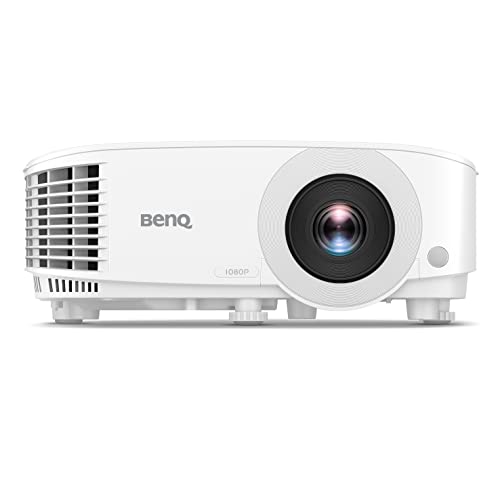
BenQ TH575 1080p Indoor Gaming Projector
- Best for: Gamers who want the brightest image in this group plus flexible placement in a bedroom or game room.
- Brand: BenQ
- Model: TH575
- Resolution: Native 1080p (1920×1080), DLP
- Brightness: 3,800 lumens
Gamers who want the brightest image in this group plus flexible placement in a bedroom or game room.
The 1.1x zoom range is modest, so measure your throw distance before buying; the built-in speaker still cannot replace a soundbar for movies.
The TH575 is BenQ’s gaming-first entry, and it leads this group on raw brightness at 3,800 lumens from its DLP engine. Its Enhanced Game Mode delivers 16.7ms low input lag, which is the figure that matters for shooters, sports titles, and fighting games where a slow projector makes controls feel detached. Dual HDMI inputs mean a console and a PC or streaming device can stay plugged in together.
Placement flexibility is better than most in this class thanks to a 1.1x zoom and auto vertical keystone, so the projector does not need to sit at one exact distance from the screen. The listing also notes a 10W speaker class output — the strongest built-in audio claim here, though external speakers still win for films — and a 3-year warranty, the longest coverage mentioned among these picks. Like the Optoma, it is 3D ready.
Watch out for: The 1.1x zoom range is modest, so measure your throw distance before buying; the built-in speaker still cannot replace a soundbar for movies.
Which One Fits Your Situation
You watch mostly movies and TV with some lights on
Choose one of the Epson models. Equal color and white brightness keeps sports, news, and streamed shows looking saturated when the room is not fully dark. The Home Cinema 880 covers a single-source setup; the Home Cinema 1080 adds brightness and a second HDMI input for a more permanent installation.
You are building a dark-room theater
The Optoma HD146X fits best. Its 25,000:1 contrast ratio gives the deepest blacks here, and the ability to project up to 301 inches means it will not limit a large screen. Pair it with external speakers and blackout curtains and it delivers the most cinema-like picture of the four.
Gaming is the main event
The BenQ TH575 is the natural pick: 3,800 lumens, 16.7ms input lag, dual HDMI, and a small zoom for dialing in placement. The Optoma HD146X is a close alternative if you also want 3D support and a slightly higher contrast figure for film nights between gaming sessions.
The projector has to move between rooms
Take the Epson Home Cinema 880. Auto picture skew correction and a single-cable HDMI setup make it the fastest to set up on a coffee table or shelf, and its balanced brightness works in whatever room it lands in without needing full darkness.
Common Mistakes
- Buying on the lumen number alone and ignoring color brightness, which is why a projector can look bright on menus but washed out in colorful scenes.
- Assuming every 1080p projector is equally good for games, when input lag varies widely and only some models quote a dedicated gaming mode.
- Placing the projector off to the side and relying on heavy keystone correction, which shrinks the usable image and softens the picture.
- Planning a screen size the room cannot support — check the throw distance and maximum image size before ordering a screen.
- Expecting the built-in speaker to carry a movie soundtrack; budget a soundbar or powered speakers into the setup from the start.
Frequently Asked Questions
Is native 1080p enough, or should this budget go toward 4K?
At the screen sizes most homes use, native 1080p from a good projector looks sharp and detailed, and every model here is genuinely native 1080p rather than pixel-shifted or downscaled. This class also buys you more brightness and better gaming response than entry 4K models typically offer, so for mixed movies and games it is a sensible place to land.
How big a screen can these projectors handle?
The Optoma HD146X lists a maximum image up to 301 inches, and the others are built for the same large-format home use. In practice, brightness is the limit: the brighter the model, the larger the image stays punchy. In a typical living room, a screen in the 100 to 120 inch range is a comfortable match for any of these four.
Do I need a screen, or is a wall fine?
A smooth, light-colored wall works, and all four projectors will produce an enjoyable picture on one. A dedicated screen adds a gain surface and a defined border that improves perceived contrast, which matters most for the DLP models in a dark room. Start with a wall if you are unsure about placement, then add a screen once the projector position is settled.
How long will the lamp last, and is replacement a concern?
All four models use lamp light sources, and lamp life varies with the brightness mode you run — eco modes extend it considerably at a small brightness cost. Replacement lamps are a normal, planned expense for this class of projector, and swapping one is a simple owner task on all of these designs. If zero lamp maintenance is a priority, you would need to look at laser models in a different class.
Related guides
- Best home projectors for bright living rooms
- Best gaming projectors with low input lag
- Best projector screens for home theater setups
- Best soundbars to pair with a home projector
As an Amazon Associate, we earn from qualifying purchases.