Our Short List of 3
All 4 Picks at a Glance
| Product | Specs | Action |
|---|---|---|
 Apple MacBook Air 13-inch Laptop with M4 chip | Check price on Amazon | |
 Lenovo IdeaPad Slim 3 15.6-inch Laptop | Check price on Amazon | |
 HP 15.6-inch Laptop | Check price on Amazon | |
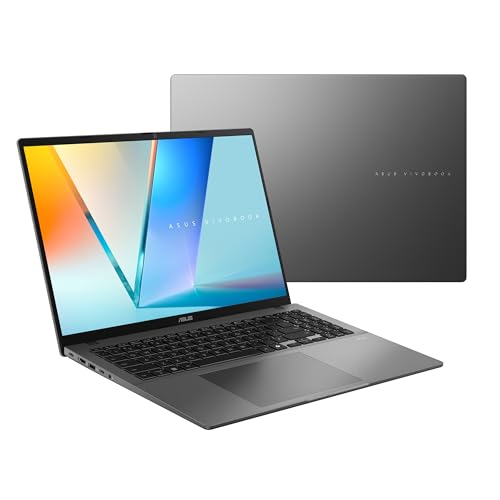 ASUS Vivobook S16 (2026) Laptop | Check price on Amazon |
Key takeaways
- Find the best student laptops for college and editing videos, from a light MacBook Air to powerful Windows machines with roomy screens and fast storage.
Introduction
A laptop that only has to survive lectures and essays is easy to buy. A laptop that also has to cut video is a different purchase altogether. The best student laptops for college and editing videos need to handle two jobs at once: all-day classes, library sessions, and note-taking on one side, and timeline scrubbing, rendering, and colour work on the other. A machine that stutters through a ten-minute 1080p edit will cost a student hours every week, while a machine that is too heavy or too short on battery will spend more time plugged into a wall than in a backpack.
This guide looks at four laptops that cover the range of what a student editor actually needs. There is a featherweight Apple machine for students who live in lecture halls and coffee shops, two Windows laptops that balance screen size and value, and a large-screen creator-oriented Windows laptop for students whose editing work is closer to a part-time job than a hobby. Each one is judged on the same things: processor power, memory, storage speed and capacity, screen quality, weight, battery life, and the ports that matter for moving footage on and off the machine. Availability changes over time, so confirm the exact configuration on the listing before ordering.
At a Glance
| Product | Best for | Key spec |
|---|---|---|
| Apple MacBook Air 13-inch with M4 chip | All-day portability and quiet editing | M4 chip, 16GB memory, 256GB SSD, 13.6-inch Liquid Retina display |
| Lenovo IdeaPad Slim 3 15.6-inch | Everyday value with a big screen | Ryzen 5 7520U, 8GB memory, 256GB SSD, 15.6-inch FHD display |
| HP 15.6-inch Laptop | Budget-friendly Windows editing | Ryzen 5 5500U, 8GB memory, 256GB SSD, 15.6-inch FHD display |
| ASUS Vivobook S16 (2026) | Serious editing power and a creator screen | Core Ultra 9 386H, 32GB memory, 1TB SSD, 16-inch WUXGA touch display |
How to Choose a Student Laptop for College and Video Editing
Processor first. Video editing leans on the processor more than almost any other student workload. A modern multi-core chip keeps preview playback smooth and shortens export times, which matters when a project deadline is hours away. Apple silicon, recent AMD Ryzen 5 chips, and Intel Core Ultra chips all handle 1080p editing comfortably, while higher-end chips such as the Core Ultra 9 in the ASUS below are better suited to 4K timelines, effects-heavy projects, and multitasking with a browser full of research tabs open at the same time.
Memory matters more than it used to. Sixteen gigabytes of memory is the sensible floor for editing video while running other apps. Eight gigabytes can still work for short 1080p projects, especially on an efficient machine, but it leaves little headroom, and many thin laptops cannot be upgraded later. If the laptop has soldered memory, buy the configuration that will still feel roomy in year three, not just in week one.
Storage should be fast and roomy. Video files are large, and a solid-state drive is non-negotiable. A 256GB drive is workable if a student keeps finished projects on an external drive, but 512GB or 1TB is far more comfortable for someone who edits every week. Check whether the drive is user-replaceable before buying, since a machine that allows a storage upgrade later can grow with the workload.
The screen is a creative tool. Editing on a dim, washed-out panel makes colour decisions unreliable. Look for a bright display with good colour coverage and a sharp resolution. A larger screen also helps, since a timeline, preview window, and effects panels all compete for space. A 13-inch screen is fine for portability, but a 15-inch or 16-inch panel is noticeably easier to edit on for long sessions.
Weight and battery decide whether it leaves the dorm. A laptop that weighs close to two kilograms with a charger in tow gets left behind, and a machine that dies after three hours of lectures is a liability. Aim for a laptop that lasts a full morning of classes on one charge, and pay attention to weight if the bag also carries textbooks.
Ports and connectivity save daily friction. At least one fast USB-C port, a standard USB-A port for older drives and peripherals, and an HDMI output for connecting to a monitor or projector cover most student needs. A headphone jack still matters for editing audio without wireless lag, and Wi-Fi 6 or newer keeps large file uploads from dragging.
Product Reviews
Apple MacBook Air 13-inch Laptop with M4 chip
The MacBook Air with the M4 chip is the portability pick in this guide, and it is the easiest laptop here to carry everywhere. The 13.6-inch Liquid Retina display is bright and sharp, with the kind of colour accuracy that makes it trustworthy for basic colour work. The M4 chip handles 1080p and light 4K editing in apps such as Final Cut Pro and DaVinci Resolve without the fans spinning up, because this machine has no fan at all, so it stays silent in a quiet library. Sixteen gigabytes of unified memory keeps the system responsive when an editor, a browser, and a notes app are all open, and the 256GB solid-state drive is fast even if it fills up quickly with footage.
Battery life is a genuine strength. Apple rates the machine for up to 18 hours of video playback, and in student use that translates into a full day of classes and an evening edit without hunting for an outlet. The 12MP Center Stage camera is a useful bonus for video calls and remote classes, and Touch ID makes unlocking the machine instant. The thin aluminium body weighs around 1.2 kilograms, so it disappears into a backpack.
The trade-offs are familiar ones. Storage is modest for a video editor, so an external drive becomes part of the workflow sooner rather than later. The port selection is limited to two USB-C ports and a MagSafe charging connector, which means a hub is needed for older drives and SD cards. There is also no dedicated graphics chip, so very heavy effects work and long 4K exports will be slower than on the ASUS below. For a student who edits short-form video, class projects, and social content, though, this is the most pleasant machine to live with day to day.
Pros:
– Silent, fanless design with excellent battery life
– Bright, colour-accurate 13.6-inch Liquid Retina display
– Light enough to carry to every class
– Strong performance per watt from the M4 chip
Cons:
– 256GB storage fills quickly with video projects
– Only two USB-C ports, so a hub is often needed
– No dedicated graphics for heavy effects work
Lenovo IdeaPad Slim 3 15.6-inch Laptop
The IdeaPad Slim 3 is the sensible middle of this guide: a full-size Windows laptop with a roomy 15.6-inch Full HD display, a capable AMD Ryzen 5 7520U processor, 8GB of memory, and a 256GB solid-state drive. The larger screen is the headline benefit for editing, because the timeline and preview window have breathing room that a 13-inch panel cannot offer. The Ryzen 5 chip is more than enough for 1080p projects, lecture recordings, and the usual student multitasking of documents, slides, and streaming.
Lenovo pitches this machine as an everyday laptop, and that shows in the details. It runs Windows 11, it has a full keyboard with a number pad, and the Arctic Grey finish looks more expensive than the price tier suggests. The 15.6-inch display is a standard Full HD panel, which is fine for arranging clips and checking framing, though students doing serious colour grading should confirm their final look on a better-calibrated screen. The 256GB drive is the main limitation, and like the MacBook Air above, this machine works best with an external drive for finished projects and raw footage archives.
Eight gigabytes of memory is the floor for editing, so this laptop suits students whose projects are mostly short-form: class presentations, vlogs, club videos, and social clips. Heavier 4K work will feel the limit sooner. The advantage is value. A student gets a big screen, a modern processor, and a full Windows system in a package that is easy to justify on a student budget, and the Slim 3 name is honest: it is slimmer and lighter than the bulky 15-inch laptops of a few years ago.
Pros:
– Large 15.6-inch display that suits timeline editing
– Capable Ryzen 5 processor for 1080p projects
– Full keyboard with number pad for productivity
– Good everyday value on a student budget
Cons:
– 8GB of memory limits heavy multitasking and 4K work
– 256GB storage needs an external drive for footage
– Standard Full HD panel is not ideal for critical colour work
HP 15.6-inch Laptop
The HP 15.6-inch laptop is the budget-friendly Windows option here, built around an AMD Ryzen 5 5500U processor with 8GB of DDR4 memory and a 256GB solid-state drive. The Ryzen 5 5500U is a six-core chip, which gives it useful headroom for rendering and for keeping an editing app responsive while other programs run in the background. The 15.6-inch Full HD display gives the same timeline space as the Lenovo, and the machine includes both USB-C and USB-A ports plus HDMI, so connecting an external monitor, a hard drive, or a projector for a class presentation is straightforward.
This is a practical, no-frills machine. It runs Windows 11, it has a built-in webcam and microphone for remote classes, and the Spruce Blue finish gives it a bit more personality than the usual black or silver slabs. The keyboard is full-size, which helps for long writing sessions as well as for editing shortcuts. For a student whose editing is mostly 1080p, this laptop delivers the essentials without asking for a large outlay.
The limitations match the tier. Eight gigabytes of memory and 256GB of storage are the same constraints as the Lenovo, so the advice is the same: keep raw footage on an external drive and close background apps during exports. The display is a standard Full HD panel rather than a creator-grade screen, so colour-critical work deserves a second look on a calibrated display. Battery life is adequate for a few hours of classes rather than a full day away from an outlet. Within those limits, this is a solid workhorse for a student who needs a capable Windows laptop for both coursework and video projects.
Pros:
– Six-core Ryzen 5 processor with useful editing headroom
– Full set of ports including USB-C, USB-A, and HDMI
– Large 15.6-inch display for timeline work
– Straightforward Windows 11 setup for class and editing
Cons:
– 8GB of memory and 256GB of storage need managing
– Standard display is not suited to critical colour grading
– Battery life is modest compared with the MacBook Air
ASUS Vivobook S16 (2026) Laptop
The ASUS Vivobook S16 is the heavy lifter of this guide and the clear pick for a student whose editing is serious rather than occasional. It pairs an Intel Core Ultra 9 386H processor with 32GB of memory and a 1TB solid-state drive, which is a combination that handles 4K timelines, effects, and multitasking without the compromises of the other machines here. The 16-inch WUXGA touch display gives the largest editing canvas in this roundup, and the 16:10 aspect ratio adds vertical room that is genuinely useful when a timeline grows long.
Thirty-two gigabytes of memory is the difference-maker. An editor can keep a project, a browser full of reference material, and a music app open at once without the system slowing down. The 1TB drive means raw footage, project files, and finished exports can live on the laptop itself instead of on an external drive, which simplifies the workflow for a student who edits daily. Wi-Fi 6 keeps large uploads moving, and Windows 11 Home with Copilot+ features covers the usual student software.
The trade-offs are size and weight. A 16-inch laptop is less convenient to carry to every lecture than the 13-inch MacBook Air, and this machine is aimed at students who edit at a desk as often as they carry the laptop around campus. The touch display is a nice bonus for scrubbing through footage, though many editors will still prefer a mouse. For a film student, a media student, or anyone running a video channel alongside their degree, this is the machine in this guide that will still feel fast in the final year.
Pros:
– 32GB of memory and a 1TB drive remove the usual bottlenecks
– Powerful Core Ultra 9 processor for 4K timelines and effects
– Large 16-inch touch display with extra vertical space
– Ample storage for footage without an external drive
Cons:
– Larger and heavier than the other laptops here
– More machine than a casual editor needs
– Battery life will not match the MacBook Air
Comparison: Which One Fits You
The right choice depends on how much editing a student actually does and how much the laptop has to travel. The MacBook Air is the pick for students who carry their laptop everywhere and edit short-form video: it is light, silent, and lasts all day, and its screen is the most trustworthy for colour in this group. The Lenovo IdeaPad Slim 3 and the HP 15.6-inch laptop are the value picks, and the choice between them comes down to configuration and availability. Both offer a big screen and a capable Ryzen 5 chip for 1080p work, and both need an external drive for serious footage libraries. The ASUS Vivobook S16 is the pick for students who edit every day, work in 4K, or run a channel alongside their studies. It costs more and weighs more, but its memory, storage, and processor remove the limits the other machines impose. A student who is unsure should weigh two questions: how often will this laptop leave the desk, and how long are the projects it will cut. Light travel and short projects point to the MacBook Air or the value Windows machines, while daily editing and long projects point to the ASUS.
FAQ
How much memory does a student video editor need?
Sixteen gigabytes is the comfortable floor for regular editing alongside other apps. Eight gigabytes works for short 1080p projects, but it leaves little room for multitasking, and many thin laptops cannot be upgraded later.
Is a 256GB drive enough for video editing?
It can be, if finished projects and raw footage live on an external drive. For weekly editing, 512GB or 1TB is far more comfortable, and a laptop that allows a later storage upgrade is worth favouring.
Can a student edit 4K video on these laptops?
Yes, with limits. The ASUS Vivobook S16 with 32GB of memory is the strongest choice for 4K. The MacBook Air handles light 4K work well thanks to the M4 chip, while the 8GB Windows laptops are better suited to 1080p projects and short 4K clips.
Does screen size matter for editing?
It does. A larger display gives the timeline, preview, and panels more room, which makes long sessions less cramped. A 13-inch screen is fine for portability, but 15-inch and 16-inch screens are noticeably easier to edit on.
Should a student choose macOS or Windows for editing?
Both work well. macOS suits students who already use Apple apps or want the MacBook Air’s battery life and silence. Windows offers more choice at lower tiers and runs the full range of editing software, including DaVinci Resolve, Premiere Pro, and CapCut.
What should a student check before buying?
Confirm the exact configuration on the listing, including memory, storage, and processor, since the same model name can hide several configurations. Also check the return policy and whether memory or storage can be upgraded later.
Conclusion
The best student laptop for college and editing videos is the one that matches how much a student edits and how far the laptop has to travel. The MacBook Air with the M4 chip is the best all-day companion: light, silent, and long-lasting, with a screen that can be trusted for colour. The Lenovo IdeaPad Slim 3 and the HP 15.6-inch laptop deliver big screens and capable processors at a friendlier tier, making them smart choices for students whose projects are mostly 1080p. The ASUS Vivobook S16 is the serious editing machine, with the memory, storage, and processor to handle 4K work through an entire degree. Pick the machine that fits the workload, keep footage on an external drive when storage is tight, and the laptop will serve both the coursework and the channel.
Disclosure: As an Amazon Associate, we earn from qualifying purchases.